AGV and AMR systems do not use WiFi like office laptops do.
A laptop can tolerate a short pause when someone walks from one room to another. An AGV moving through a production line cannot always afford that pause. If wireless communication drops during a route update, obstacle warning, traffic-control command, or task dispatch, the result may be a vehicle stop, delayed material handling, or an unstable production workflow.
That is why AGV WiFi roaming deserves its own network design conversation.
In an industrial WiFi network, roaming is the process of a mobile device moving from one access point to another while trying to maintain communication. For AGVs and AMRs, the challenge is not only whether the vehicle can reconnect. The real question is whether it can move through the site with acceptable latency, packet loss, and application stability.
This article explains why AGV/AMR systems need reliable wireless roaming, why disconnections happen, what occurs during AP roaming, and how AC+AP architecture can help engineers build a more stable industrial WiFi network.
Why AGV/AMR Systems Need Reliable Wireless Roaming
AGVs and AMRs are mobile by design. They move between warehouses, production lines, loading areas, charging stations, inspection zones, and traffic intersections. Along the route, the vehicle may pass through the coverage areas of many industrial access points.
During that movement, the wireless network may carry several types of data:
- Route instructions and task dispatching
- Traffic control and vehicle coordination
- Obstacle or safety-related status updates
- Sensor and telemetry data
- Video or diagnostic data
- Vehicle status, battery status, and alarm information
- Communication with scheduling or management platforms
The network does not need to be perfect in a laboratory sense. It needs to be predictable in the real site.
A short delay may be acceptable for a maintenance tablet. The same delay may be unacceptable for a vehicle that depends on timely instructions. A few lost packets may be invisible during casual browsing. They may matter when a robot is crossing a busy production area.
A 2025 research paper, Network-Aware Control of AGVs in an Industrial Scenario, also treats communication and control as connected problems. The study explicitly considers network metrics such as delay and packet loss together with AGV control behavior. For engineering teams, the practical lesson is clear: wireless performance and AGV behavior should be evaluated together, not separately.

Common Causes of AGV WiFi Disconnection
AGV WiFi disconnection is rarely caused by one single factor. In most projects, instability comes from a combination of RF design, AP configuration, client behavior, and industrial site conditions.
1. Weak or Uneven Coverage
If the AGV route passes through weak signal areas, the vehicle may hold on to a poor AP connection for too long or fail to connect quickly to the next AP.
Coverage problems often appear near corners, doorways, metal structures, elevator areas, loading docks, or areas with dense equipment. A static heatmap may look acceptable, but the AGV route may still include short problem zones.
2. Excessive AP Overlap or Poor AP Placement
Too little coverage causes dead zones. Too much overlap can also create problems.
If several APs are visible with similar signal strength, the AGV client may not choose the best AP at the right moment. Poor AP placement can create unstable roaming behavior, especially when vehicles move quickly or follow fixed lanes.
3. Inconsistent SSID or Security Settings
For roaming to work well, APs serving the AGV route should use consistent SSID and security settings. If settings differ between APs, the vehicle may need a slower reconnect or reauthentication process.
This is one reason controller-managed AC+AP architecture can be helpful. It reduces the risk of configuration drift across many APs.
4. Slow Reauthentication During AP Transition
When a client moves from one AP to another, the transition may involve scanning, selecting a new AP, authentication, association, and key handling. If this process takes too long, applications may see a communication pause.
Fast roaming is commonly discussed together with IEEE 802.11 mechanisms such as Fast BSS Transition, Radio Resource Measurement, and Wireless Network Management. The IEEE 802.11 Working Group maintains the standards family behind WLAN technologies, including task areas related to these roaming and management mechanisms.
In practice, however, a standard name is not enough. Roaming performance depends on whether the AP, controller, client device, security mode, RF design, and application behavior work together.
5. RF Interference in Industrial Sites
Industrial environments are noisy.
Metal surfaces, moving machinery, motors, inverters, high-power equipment, dense racks, and temporary obstructions can all affect wireless behavior. A clean test in an open office does not prove that the same network will perform well around production equipment.
6. Client-Side Roaming Behavior
The AGV wireless client makes important decisions. It decides when the current AP is no longer good enough, which AP to scan for, and when to roam.
Some clients roam aggressively. Others stay connected to a weak AP too long. For AGV/AMR systems, the vehicle-side wireless client must be evaluated as part of the network design.
What Happens During AP Roaming
AP roaming sounds simple: the AGV leaves one AP and connects to another.
The process behind it is more delicate.
A typical roaming event may include:
- The AGV client detects that the current AP signal or link quality is degrading.
- The client scans for candidate APs.
- It evaluates the next AP based on signal, configuration, and roaming behavior.
- The client authenticates and associates with the new AP.
- Security keys or session information are handled according to the configured security mode.
- Traffic resumes through the new AP.
If this process is slow, the AGV application may experience delay or packet loss. If it fails, the vehicle may disconnect and reconnect after a longer interruption.
For AGV/AMR applications, engineers should pay attention to more than the roaming feature list. The important measurements are:
- Handover time
- Packet loss during roaming
- Latency during route movement
- Reconnection behavior after a failed roam
- Application response during AP transition
- Vehicle behavior when communication becomes unstable
This is why roaming should be tested on the actual route, with the actual AGV client, APs, controller, security settings, and application traffic.
How Wireless LAN Controllers Support Fast Roaming
A wireless LAN controller does not magically fix poor RF design. It cannot make a badly placed AP become a good one. It also cannot force every client device to roam perfectly.
What it can do is make the wireless network more consistent and manageable.
In AC+AP architecture, the controller acts as the centralized management point, while APs provide wireless access in the field. For AGV WiFi roaming, this can help in several practical ways.
Unified AP Configuration
Roaming becomes harder when APs along the vehicle route are configured differently.
A controller can help apply consistent SSID, security, access, and management settings across APs. This reduces the chance that one AP behaves differently from the rest of the AGV route.
Centralized AP Monitoring
When roaming problems happen, engineers need visibility.
Which AP was the AGV connected to before the drop? Which AP did it try to join next? Are APs online? Are wireless terminals visible? Are configuration settings consistent?
Controller-based management gives the team a better starting point for troubleshooting than logging into APs one by one.
Batch Deployment and Maintenance
AGV routes may require many APs across production and logistics areas. A controller can make AP deployment, grouping, monitoring, and upgrades more efficient.
This matters because industrial maintenance windows are short. Teams often cannot stop production simply to adjust wireless settings AP by AP.
Access Control and Traffic Policy
AGV networks may need controlled access. Unauthorized terminals should not join production wireless networks. Production traffic may also need segmentation or priority handling.
Depending on the controller and AP system, AC+AP architecture can support wireless terminal management, blacklist and whitelist policies, VLAN settings, routing, VPN, NAT, and related network functions.
Network Design Tips for AGV/AMR WiFi
Reliable AGV WiFi roaming is an engineering result. It comes from route planning, RF design, AP configuration, client validation, traffic policy, and maintenance discipline working together. For AGV wireless communication, the goal is not simply to make the signal visible everywhere. The goal is to keep the vehicle connected while it is moving, turning, stopping, loading, charging, and passing through interference-prone areas. In practical terms, AGV WiFi requirements should include route-wide coverage, predictable roaming, low packet loss, acceptable latency, secure device access, enough bandwidth for control and diagnostic traffic, and a maintenance model that can support future robot expansion.
1. Start With the AGV Route and Workflow
Do not design the AGV WiFi network only from the building floor plan. Start from the vehicle workflow.
Map the actual AGV/AMR routes, intersections, narrow aisles, loading points, elevator areas, charging stations, parking zones, and queueing areas. Mark where vehicles slow down, turn, wait, or exchange task information with the management platform. These points often matter more than open spaces with easy coverage.
For each critical area, ask what the wireless network must support there. Is the vehicle receiving a route command? Is it uploading safety status? Is video inspection running? Is the AGV crossing an intersection where traffic coordination matters? These answers should influence AP placement and roaming boundaries.
2. Design Coverage With Roaming Boundaries in Mind
Coverage is not only about signal strength. It is also about where AP transitions happen.
A roaming boundary should not be placed in a high-risk location if it can be avoided. For example, avoid forcing the AGV to roam exactly at a traffic intersection, loading position, turning point, or safety-critical zone. If a roam is required, it is better for the transition to occur in a predictable part of the route where the application can tolerate a short handover.
Also avoid both extremes: dead zones and uncontrolled overlap. Dead zones create obvious drops. Excessive overlap can make the AGV client hesitate between APs or roam at the wrong time. A good AGV WiFi network gives the client a clear next AP without creating unstable AP selection.
3. Keep SSID, Security, and Radio Settings Consistent
AGV roaming routes should use consistent SSID and security settings across the APs that serve the vehicle path. Inconsistent configuration can lead to slower transitions, failed authentication, or unpredictable client behavior.
This is especially important when the AGV WiFi network includes many APs and multiple maintenance engineers. A controller-managed AC+AP architecture can reduce configuration drift by applying policies centrally instead of relying on repeated manual AP setup.
4. Separate AGV/AMR Traffic From General Wireless Access
AGV/AMR communication should not always share the same network policy as office WiFi, guest WiFi, or general maintenance access.
Where the project requires it, separate AGV traffic with VLANs, routing policies, access control, or dedicated SSIDs. This helps protect production communication from unnecessary load, unauthorized terminals, and unpredictable traffic bursts.
This matters more when the same wireless infrastructure carries both control data and high-bandwidth traffic such as video inspection.
5. Validate the Wireless Client on the Vehicle
The AP and controller are only part of the system. The AGV wireless client is equally important.
Check whether the client supports the roaming behavior required by the project. Test how it reacts to signal changes, AP overlap, interference, and security settings. If the client holds on to a weak AP for too long, the AGV WiFi network may look good in a survey but still fail during motion.
For AMR wireless communication, this client-side behavior can be even more visible because routes may be more dynamic than fixed AGV paths.
6. Test With Real Traffic, Real Motion, and Real Load
Static signal testing is useful, but it is not enough.
Test the AGV while it moves at normal operating speed. Run the real application traffic if possible, including control commands, telemetry, alarms, and video streams. Watch for packet loss, delay, reconnect behavior, and application warnings during AP transition.
If the site will eventually run dozens or hundreds of vehicles or wireless terminals, test the network under realistic load. A single AGV test may pass while a high-density AGV WiFi network still struggles during peak operation.
7. Account for Industrial Interference and Physical Changes
Industrial spaces change. Machines move. Metal racks are added. Temporary materials block paths. New robots are introduced. VFDs, motors, welding equipment, and heavy machinery may create interference that does not appear in a simple office-style WiFi test.
For AGV/AMR projects, wireless acceptance testing should include representative production conditions. Test during normal operation, not only during a quiet commissioning window.
8. Plan for Maintenance From Day One
AGV wireless networks need ongoing maintenance. Routes change, APs need upgrades, logs need review, and new mobile robots may be added.
Choose an architecture that allows engineers to monitor AP status, update configuration, review terminal access, and troubleshoot roaming problems without logging into every AP separately. This is one of the practical reasons AC+AP architecture is often preferred for larger AGV/AMR deployments.
Tips to Ensure AGV/AMR Seamless Roaming
Seamless roaming is the user experience the project wants. Fast roaming is one part of achieving it. For AGV and AMR systems, the target is to reduce handover delay and packet loss enough that vehicle operation remains stable during AP transitions.
Use these practical tips when designing or troubleshooting AGV/AMR seamless roaming:
- Keep one consistent SSID and security profile across the AGV roaming domain.
- Avoid placing AP transition zones at intersections, docking stations, loading points, or safety-critical areas.
- Tune AP placement and transmit power so the AGV sees a clear next AP instead of many similar candidates.
- Confirm that the AGV wireless client supports the roaming behavior required by the project.
- Validate roaming with the actual AGV application traffic, not only ping tests.
- Measure packet loss, latency, handover time, and application recovery during movement.
- Keep AP firmware and configuration consistent across the route.
- Use centralized monitoring to identify which APs and terminals are involved in roaming failures.
- Segment AGV/AMR traffic where production reliability or security requires it.
- Re-test roaming after layout changes, new equipment installation, AP replacement, or robot fleet expansion.
For industrial WiFi roaming, the best results usually come from treating roaming as a full system design issue: APs, controller, client, RF environment, security settings, and application tolerance all need to match.
Real-World Case: Mobile Robots in a Smart EV Assembly Plant
A New Energy Vehicle smart assembly plant shows why AGV/AMR roaming must be designed for real production conditions. In this project, mobile robots on the general assembly line needed stable wireless connectivity for AGV control and video quality inspection while moving through a metal-rich, high-interference factory environment. The full project is described in Maisvch’s smart EV assembly plant case study: Seamless Connectivity for Mobile Robots in Smart EV Assembly Plant.
The factory environment created several wireless challenges:
- AGVs and inspection robots moved constantly between different APs.
- The network required handover latency of less than 50ms to prevent robots from stopping or stalling.
- Automated video quality inspection required more than 100Mbps bandwidth per terminal.
- Variable Frequency Drives and heavy machinery created significant electromagnetic noise.
- The solution needed industrial-grade anti-interference capability, including DFS and industrial shielding.
To support both control traffic and video inspection, the deployment used nearly 100 MIR785-W industrial 5G/Wi-Fi 6 routers. Wi-Fi 6 supported high-density connections and video analytics, while 5G provided a flexible backhaul option where cabling was difficult.
The reported result was sub-50ms roaming, allowing AGVs to switch network nodes without interrupting control commands and video streams. The case also notes that the solution became a standard application blueprint for the robotics integrator’s future automotive projects.
For this blog topic, the key lesson is not simply that the project used faster wireless hardware. It is that AGV/AMR roaming must be designed for the real operating environment: metal-rich spaces, high interference, continuous motion, control traffic, video traffic, and production continuity.
Industrial AP and Controller Selection Checklist
When choosing industrial wireless equipment for AGV/AMR networks, evaluate the whole system, not only the AP data rate or headline WiFi generation.
Use this checklist during selection:
- Does the AP support the required WiFi generation and frequency bands?
- Is the device designed for industrial temperature, vibration, and EMC conditions?
- Does the AGV wireless client support the required roaming behavior?
- Can the controller centrally manage AP grouping, configuration, and monitoring?
- Does the system support wireless terminal lists and blacklist/whitelist filtering?
- Can AP firmware upgrades be handled efficiently?
- Are VLAN, routing, DHCP, VPN, NAT, and access-control functions available if needed?
- Can engineers view AP status, logs, and terminal information centrally?
- Does the solution support route-based field testing and tuning?
- Can it support the expected number of AGV/AMR devices and other wireless terminals?
- Is local technical support available for commissioning and troubleshooting?
For AGV projects, do not choose only by peak throughput. Roaming stability, maintainability, field support, and compatibility with the vehicle-side client are often more important than maximum data rate.
For a more detailed engineering reference, download the Industrial Wireless Guide for AGV/AMR. It provides additional guidance for planning AGV/AMR wireless communication in industrial environments, including network requirements, roaming considerations, and application-oriented deployment design.
Maisvch AGV/AMR Wireless Communication Solution
For smart warehousing and logistics environments, Maisvch’s Industrial AGV/AMR Wireless Communication System is built around the same requirements discussed above: reliable connectivity, real-time data transmission, flexible deployment, and operation in demanding industrial conditions.
The solution defines communication infrastructure requirements such as sub-150ms handover times, industrial-grade hardware, flexible connectivity modes, support for high-density environments of 200+ devices, centralized network management, and bandwidth for control commands, sensor data, and video streams.
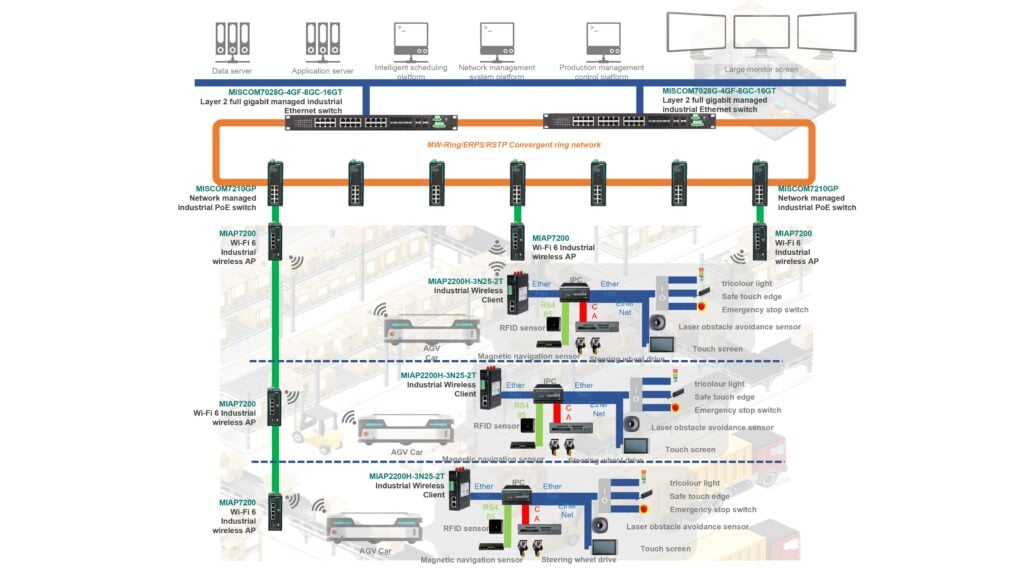
In the described deployment model, the MIAP2200H-3N25-2T industrial wireless client is installed on AGV carts, while MIAP7200 Wi-Fi 6 industrial wireless APs provide factory coverage. Through the wireless APs, AGV driving trajectory and safety data are uploaded to the management platform, and the factory APs can issue route commands back to the AGVs.
The solution also states that Maisvch’s intelligent roaming algorithm can achieve handover times under 50ms, helping maintain connectivity as vehicles move through the facility. As with any industrial wireless project, the actual result should be validated in the real site with the selected AGV client, AP layout, controller settings, and application traffic.
Maisvch MIAC6500-2GF for Centralized AP Management
For controller-based AGV/AMR wireless networks, the Maisvch MIAC6500-2GF is a 10-port full Gigabit rack-mounted industrial wireless controller that can centrally manage Maisvch wireless AP equipment.
According to the official product page, MIAC6500-2GF provides 8 Gigabit RJ45 interfaces, 2 Gigabit SFP fiber ports, 2 USB interfaces, 1 VGA interface, a 19-inch 1U rack-mounted high-strength metal casing, dual fans for heat dissipation, AC110-240V input, CE/FCC/RoHS certification, and an operating temperature range of -40°C to +65°C.
Its listed management functions include centralized management of wireless AP devices, wireless AP list and grouping, wireless terminal list and blacklist/whitelist filtering, wireless AP batch upgrade, AC online monitoring, DHCP server, static routing, VLAN settings, VPN functions, SNMP, local and remote logs, scheduled restart, configuration backup and recovery, firmware upgrade, and factory settings restoration.
For AGV/AMR projects with many APs, these capabilities are relevant because roaming stability depends not only on radio coverage, but also on consistent AP configuration, centralized monitoring, and efficient maintenance.
For a broader explanation of AC+AP architecture, read: Wireless LAN Controller for Industrial Access Points: AC+AP Architecture for Reliable Industrial WiFi.
FAQ
Why do AGVs lose WiFi connection when moving between access points?
Common causes include weak coverage, poor AP placement, excessive or unstable AP overlap, inconsistent SSID or security settings, slow authentication, RF interference, and client-side roaming behavior. The issue often appears only when the AGV is moving, which is why field testing is essential.
What is AGV WiFi roaming?
AGV WiFi roaming is the process of an AGV moving from one AP coverage area to another while maintaining wireless communication. Good roaming should minimize handover delay, packet loss, and application interruption.
Is fast roaming the same as seamless roaming?
Not exactly. Fast roaming refers to reducing the time required for AP transition. Seamless roaming is the desired user or application experience. Whether the experience is seamless depends on the whole system, including APs, controller, client device, RF design, security settings, and application tolerance.
Can a wireless LAN controller solve AGV roaming problems?
A controller can help by centralizing AP configuration, monitoring, access control, and maintenance. It can support a more consistent roaming environment. However, it cannot replace proper RF planning, AP placement, client validation, and real-motion testing.
What should be tested in an AGV WiFi network?
Engineers should test signal quality along the route, roaming handover time, packet loss, latency, reconnect behavior, application stability, AP load, interference, and vehicle behavior during AP transitions.
Which is better for AGV/AMR wireless communication: standalone APs or AC+AP architecture?
For small and simple wireless coverage, standalone APs may be enough. For AGV/AMR systems with many APs, moving vehicles, access control requirements, and long-term maintenance needs, AC+AP architecture is usually more suitable.
What Maisvch products are relevant for AGV/AMR WiFi?
The Maisvch AGV/AMR solution page lists MIAP2200H-3N25-2T as an industrial wireless client for AGV carts and MIAP7200 as a Wi-Fi 6 industrial wireless AP. The EV assembly plant case study features MIR785-W industrial 5G/Wi-Fi 6 routers. For centralized AP management, MIAC6500-2GF is the relevant industrial wireless controller.