Wireless networks in industrial sites rarely stay small for long.
A factory may start with a few access points covering one production line. Later, the same network needs to support AGV/AMR systems, handheld terminals, inspection robots, video monitoring, mobile HMIs, and maintenance laptops across workshops, warehouses, and outdoor areas. At that point, managing each access point one by one becomes slow, inconsistent, and risky.
This is where a wireless LAN controller becomes valuable.
In an industrial WiFi network, a wireless LAN controller, also called a WLAN controller, WiFi controller, access point controller, or wireless AC controller, acts as the central management device for multiple wireless access points. Instead of configuring every AP separately, engineers can use the controller to manage AP discovery, configuration, monitoring, firmware upgrades, access policies, and roaming-related settings from one interface.
For industrial access points, this centralized AC+AP architecture is not just a convenience. It helps reduce deployment work, keep wireless policies consistent, and support more reliable connectivity for mobile industrial devices.
What Is a Wireless LAN Controller?
A wireless LAN controller is a network device used to manage multiple wireless access points within a WLAN.
Cisco defines a WLAN controller as a device that manages wireless access points, while the access point provides the wireless connection between WiFi-capable devices and the wired network. In simple terms:
- The access point provides wireless coverage.
- The wireless LAN controller manages how multiple access points behave as one network.
In an office, this may mean easier guest WiFi management and smoother roaming between floors. In an industrial site, the stakes are different. A wireless issue may interrupt AGV movement, delay data collection, disconnect a handheld terminal, or make maintenance work harder during production.
That is why industrial wireless LAN controller design must consider more than coverage area. It must also consider reliability, scalability, maintenance, security, and the physical conditions of the site.
Wireless LAN Controller vs Access Point
An access point and a wireless LAN controller work together, but they do different jobs.
|
Item |
Wireless Access Point |
Wireless LAN Controller |
|
Main role |
Provides wireless access for terminals |
Centrally manages multiple APs |
|
Typical function |
RF signal transmission, SSID broadcasting, client connection |
AP configuration, monitoring, access control, upgrade, policy management |
|
Management model |
Standalone or controller-managed |
Centralized management |
|
Best fit |
Small or simple wireless networks |
Multi-AP networks, industrial sites, mobile-device environments |
|
Maintenance |
Each AP may need individual configuration |
APs can be managed from one interface |
A standalone AP can work well in a small network. But when a site has dozens or hundreds of APs, independent AP management becomes difficult. Firmware versions drift. SSID settings become inconsistent. Access rules are changed on some devices but forgotten on others. Troubleshooting also takes longer because engineers must check multiple devices separately.
A controller-based network reduces that burden. APs become part of a centrally managed system instead of isolated wireless islands.
Fat AP vs Thin AP in Industrial WiFi
The terms fat AP and thin AP are often used when discussing wireless architecture.
A fat AP is a standalone access point. It contains most of the control, configuration, and management functions locally. Each AP can usually run independently.
A thin AP depends on a wireless controller for centralized management. The AP focuses on wireless access, while the controller handles configuration, policy, monitoring, and other management functions.

For a small office or a temporary site, fat AP mode may be enough. For industrial WiFi, thin AP plus controller management is often easier to scale.
The problem with fat AP architecture is not that it cannot work. The problem is what happens when the network grows. If every AP has to be configured, upgraded, checked, and adjusted separately, wireless operations become labor-intensive. Inconsistent settings can also create hidden failure points.
In industrial automation, these small inconsistencies matter. A mobile terminal may behave differently when moving between two APs. An AGV may pause when wireless communication is interrupted. Maintenance teams may spend too much time checking AP settings instead of solving production problems.
AC+AP architecture is designed to reduce that complexity.
How AC+AP Architecture Works
In AC+AP architecture, the wireless AC controller is the central control and management point, while industrial access points provide wireless access across the site.
A typical industrial deployment may look like this:
Wireless LAN Controller
↓
Industrial Ethernet Switches
↓
Industrial Access Points
↓

AGV/AMR systems, inspection robots, handheld terminals, PLC-related equipment, cameras, and maintenance devices
The controller can discover and manage APs, apply unified configuration, monitor AP status, and help engineers maintain a consistent wireless network. The APs handle the wireless connection for field devices and forward traffic into the industrial network.
This architecture is useful in sites where wireless coverage is distributed across large spaces, such as smart factories, mines, railway facilities, logistics centers, smart parking lots, photovoltaic plants, and energy storage sites.
Why Industrial Access Points Need Controller-Based Management
Industrial wireless networks face conditions that are very different from standard office WiFi.
First, the physical environment is harsher. Metal structures, moving equipment, electrical noise, outdoor temperature changes, and complex layouts can all affect wireless performance.
Second, industrial networks often carry different traffic types at the same time. Production control traffic, monitoring data, video, maintenance access, and office traffic may share parts of the network. These traffic types do not have the same priority.
Third, many industrial wireless devices move. AGVs, AMRs, inspection robots, forklifts, and handheld terminals do not stay under one AP. They move across coverage zones. If roaming is slow or inconsistent, the user may see disconnection, delay, or unstable communication.
Fourth, maintenance windows are limited. Industrial sites cannot always stop production just to reconfigure APs one by one.
A wireless LAN controller helps address these issues by giving engineers one place to manage the wireless network.
Key Benefits of a Wireless LAN Controller for Industrial WiFi
1. Centralized AP Configuration
When APs are managed separately, every configuration change becomes repeated work. SSID settings, passwords, network modes, access policies, and management parameters may need to be changed on each device.
With controller-based management, AP configuration can be handled centrally. This reduces deployment time and helps keep AP settings consistent across the site.
2. Batch Upgrade and Easier Maintenance
Industrial wireless networks need long-term maintenance. Firmware updates, configuration backups, AP restarts, and status checks are part of normal operation.
A wireless LAN controller can simplify these tasks by supporting centralized AP monitoring and upgrade workflows. Instead of logging into each AP separately, engineers can manage the AP group from the controller interface.
3. Better Visibility Into the Wireless Network
In a standalone AP network, engineers may know that a terminal is disconnected, but not immediately know which AP it used, what the AP status is, or whether the issue is local or network-wide.
A controller can provide a more centralized view of AP status, terminal access, and network conditions. That visibility is valuable during troubleshooting.
4. Access Control for Wireless Terminals
Wireless access in industrial networks should be controlled carefully. Unauthorized terminals may create security risks or interfere with production systems.
Controller-based management can support access policies such as wireless blacklists and whitelists, helping engineers define which terminals are allowed or blocked. NIST’s WLAN security guidance also emphasizes that WLAN security depends on securing components such as client devices, APs, and wireless switches throughout design, deployment, maintenance, and monitoring.
Controller-based management can support access policies such as wireless blacklists and whitelists, helping engineers define which terminals are allowed or blocked. NIST SP 800-153: Guidelines for Securing Wireless Local Area Networks also emphasizes that WLAN security depends on securing components such as client devices, APs, and wireless switches throughout design, deployment, maintenance, and monitoring.
5. Network Policy Management
Industrial wireless networks often need more than basic WiFi access. They may require VLAN settings, DHCP, static routing, VPN access, NAT, access restrictions, diagnostics, and monitoring.
A controller-based architecture provides a better foundation for managing these functions consistently, especially when the wireless network connects to production systems, remote maintenance, or segmented industrial networks.
Fast Roaming for AGV/AMR and Mobile Industrial Devices
One of the most important industrial use cases for controller-based WiFi is mobility.
AGV and AMR systems move continuously across the factory. As they move, they may leave the coverage area of one AP and enter another. If the device has to perform a slow reauthentication process during every AP transition, communication may pause. In some applications, even a short interruption can affect task execution, navigation, or real-time monitoring.
Fast roaming is often discussed together with standards and mechanisms such as IEEE 802.11r, 802.11k, and 802.11v. In practice, roaming performance depends on the AP, controller, client device, security mode, RF design, and site conditions. It should not be treated as a single checkbox.
For industrial projects, the safer approach is to design and test roaming as a system:
- Keep SSID and security settings consistent across APs.
- Plan AP locations to avoid both dead zones and excessive overlap.
- Check whether mobile terminals support the roaming methods required by the project.
- Test roaming under real motion, not only with static signal measurements.
- Monitor packet loss, latency, and reconnection behavior during AP transitions.
- Confirm controller and AP compatibility before enabling fast roaming features.
A wireless LAN controller cannot fix poor RF planning by itself. But it gives engineers a central point to coordinate AP settings, monitor behavior, and maintain a more consistent environment for mobile industrial devices.
For this reason, fast roaming should be evaluated as an engineering result, not only as a feature name. The real question is whether mobile devices can move through the actual site without unacceptable packet loss, delay, or reconnection behavior.
Real-World Case: Smart Factory AGV Roaming With 150+ Industrial APs
In a real smart factory project for an automotive manufacturing customer, Maisvch deployed the MIAC6500-2GF industrial wireless AC controller to centrally manage more than 150 industrial access points across the production site.
The factory needed reliable wireless communication for AGVs and inspection robots operating in a complex workshop environment. As these mobile devices moved between different AP coverage areas, the wireless network had to support fast roaming without interrupting production-related communication.
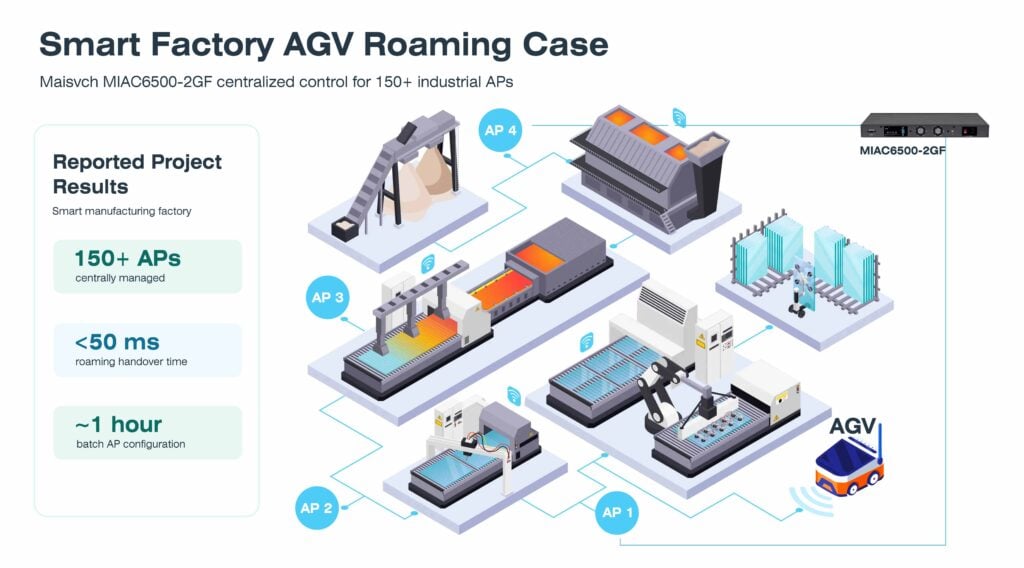
By using Maisvch’s AC+AP architecture, the project achieved:
- Centralized management of 150+ industrial wireless APs
- Seamless roaming for AGVs and inspection robots
- Roaming handover time of less than 50 ms
- Batch AP configuration completed in about 1 hour
- Wireless access control through whitelist and blacklist policies
- Policy routing to prioritize key production data traffic
This case shows why a wireless LAN controller matters in industrial automation. In a conventional standalone AP deployment, configuring and maintaining more than 150 APs would require significant manual work and could easily lead to inconsistent settings. With centralized AC+AP management, the factory was able to improve deployment efficiency, maintain unified wireless policies, and support stable wireless communication for moving production equipment.
For AGV/AMR applications, the value of the controller is not only that it manages APs. Its larger role is to help keep the wireless network predictable while mobile devices move through the factory. That predictability is what industrial teams need when wireless communication is tied directly to production continuity.
What to Look for in an Industrial WiFi Controller
When choosing a wireless LAN controller for industrial access points, engineers should look beyond the generic WLAN controller definition. The following items are especially important for industrial deployments:
- Centralized management for industrial APs
- AP grouping and AP status monitoring
- Wireless terminal list management
- Blacklist and whitelist filtering
- Batch AP upgrade capability
- Internal and external network settings
- DHCP server and static routing
- VLAN support
- VPN client and server support
- Network diagnostics
- SNMP monitoring
- Configuration backup and recovery
- User permission management
- Local and remote log management
- Wide operating temperature
- Industrial housing and installation options
- Compatibility with the selected industrial AP models
For AGV/AMR, railway, mining, and energy applications, the controller should also fit the site’s maintenance model. Some projects prefer local on-premises management. Others may require remote access, segmented networks, or integration with existing monitoring systems.
Maisvch MIAC6500-2GF Industrial Wireless Access Controller
The Maisvch MIAC6500-2GF is a 10-port full Gigabit rack-mounted industrial wireless access controller designed to centrally manage Maisvch wireless AP equipment.
According to the Maisvch official product page, the MIAC6500-2GF provides:
- 8 Gigabit RJ45 ports
- 2 Gigabit SFP fiber ports
- 2 USB interfaces
- 1 VGA interface
- 19-inch 1U rack-mounted high-strength metal casing
- Dual fans for heat dissipation
- Operating temperature range of -40°C to +65°C
- AC110~240V input
- CE, FCC, and RoHS certification
The product supports web-based network management functions including AC intelligent control, AP grouping, wireless blacklist and whitelist, AP system upgrade, AP network management, internal and external network settings, DHCP server, static routing, VLAN settings, access control, network diagnosis, VPN client and server, dynamic DNS, SNMP, and status monitoring.
For maintenance, the official page also lists user permission management, local and remote log management, scheduled restart, configuration backup and recovery, firmware upgrade, and factory reset.
This real-world smart factory deployment demonstrates how the MIAC6500-2GF can be used in large-scale industrial wireless networks where AP quantity, roaming performance, and deployment efficiency all matter.
Application Scenarios
Smart Factory and AGV/AMR Systems
In smart factories, wireless networks often connect AGVs, AMRs, mobile terminals, and inspection devices. Controller-based AP management helps keep wireless configuration consistent across the production area and supports a more manageable roaming environment.
Smart Mines
Mining sites may need wireless access for underground terminals, inspection systems, and remote maintenance. Industrial wireless controllers help centralize AP management and access control in harsh environments.
Railway and Transportation Networks
Transportation environments often need reliable wireless coverage across stations, depots, maintenance areas, or trackside systems. Centralized AP management can simplify operation across distributed sites.
Power, Photovoltaic, and Energy Storage Sites
Energy sites may have outdoor or semi-outdoor network areas, remote monitoring points, and strict maintenance requirements. Industrial wireless access controllers can help organize AP management and network policy control.
FAQs
1. What is a wireless LAN controller? LAN controller?
A wireless LAN controller is a device that centrally manages multiple wireless access points in a WLAN. It is used for AP configuration, monitoring, policy management, access control, and maintenance.
2. Is a WiFi controller the same as a WLAN controller?
In many contexts, yes. The terms WiFi controller, WLAN controller, wireless LAN controller, access point controller, and wireless AC controller are often used to describe similar centralized AP management devices.
3. What is the difference between a wireless LAN controller and an access point?
An access point provides wireless connectivity for client devices. A wireless LAN controller manages multiple access points and helps maintain consistent configuration, monitoring, security, and network policies.
4. What is the difference between fat AP and thin AP?
A fat AP works more independently and is usually configured individually. A thin AP is managed by a controller. Thin AP architecture is often better for larger wireless networks that need centralized management.
5. Do industrial access points need a controller?
Not always. A small industrial network may use standalone APs. A controller becomes more useful when the site has many APs, mobile devices, strict access control, or higher maintenance requirements.
6. Why do AGV WiFi connections drop when moving between APs?
Common causes include weak coverage, poor AP placement, inconsistent SSID or security settings, slow roaming, RF interference, and client-side roaming behavior. A controller can help standardize AP settings, but proper RF planning and field testing are still required.
7. What is AC+AP architecture?
AC+AP architecture uses an access controller as the central management device and access points as wireless access nodes. The controller manages APs, while APs provide WiFi coverage for terminals.