In an office network, a broadcast storm may look like a slow connection, dropped video call, or temporary access issue. In an industrial Ethernet network, the same problem can interrupt PLC communication, freeze HMI screens, affect SCADA visibility, or stop a production cell from responding.
That is why broadcast storms should not be treated as a simple IT nuisance in OT environments. They are a network reliability risk.
Industrial networks often connect PLCs, HMIs, remote I/O, drives, industrial cameras, edge gateways, wireless bridges, and SCADA systems across large facilities. Many of these devices exchange time-sensitive data. When abnormal broadcast traffic floods the network, the result can be much more serious than “the network is slow.”
This article explains what a broadcast storm is, why it happens, how to detect it, and how industrial managed switches help prevent it in real-world OT networks.
What Is a Broadcast Storm?
A broadcast storm occurs when excessive broadcast traffic floods a LAN and consumes network bandwidth or device processing resources. Cisco describes a LAN storm as a condition where packets flood the LAN, creating excessive traffic and degrading network performance. Storm control is designed to prevent LAN ports from being disrupted by broadcast, multicast, or unicast storms.
In Ethernet networks, broadcast frames are sent to all devices within the same broadcast domain. This is normal behavior. Protocols such as ARP rely on broadcast communication to discover device addresses.
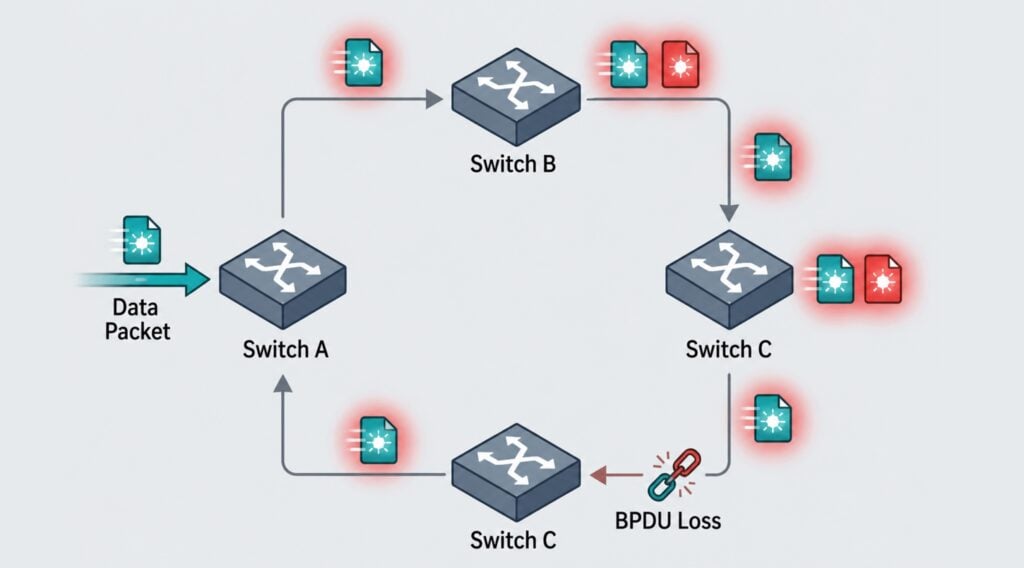
The problem starts when broadcast traffic becomes excessive or circulates repeatedly. In a Layer 2 loop, for example, switches may keep forwarding the same broadcast frames again and again. Since Ethernet frames do not have a TTL field like IP packets, a loop can quickly multiply traffic until the network becomes unstable.
A broadcast storm is not just “more traffic than usual.” It is uncontrolled traffic propagation that can prevent normal communication from taking place.
What Causes a Broadcast Storm?
Most broadcast storms are not caused by one single factor. They usually come from a combination of network design, cabling mistakes, missing loop protection, or faulty devices.
1. Network Loops
A network loop is one of the most common causes of a broadcast storm. It happens when two or more active Layer 2 paths form a loop between switches.
In industrial sites, loops may appear after:
- A maintenance technician connects a second cable “for backup”
- A temporary switch is added during commissioning
- A redundant fiber link is connected without proper protocol configuration
- A wireless bridge creates an unexpected Layer 2 path
- An unmanaged switch is installed in a control cabinet without documentation
Redundancy is important in industrial networks, but redundancy without loop prevention can become a risk.
2. Incorrect Cabling or Temporary Field Changes
Many broadcast storms begin with a small field change. A new HMI is installed. A camera is moved. A cabinet is rewired. A contractor connects a spare Ethernet cable without knowing the full topology.
The network may run normally for months, then fail after one cable is added.
This is why network documentation and port labeling matter in OT environments. A simple cabling mistake can become a plant-wide communication problem if the network has no protection mechanism.
3. Misconfigured Redundant Links
Industrial Ethernet often uses redundant paths to improve availability. However, redundant links must be controlled by protocols such as STP/RSTP, MSTP, ERPS, or vendor-specific ring protocols.
Redundant links can lead to network loops, broadcast storms, and MAC address drifting if not properly controlled, while STP and related protocols are designed to address these problems.
The key point is simple: redundancy must be engineered, not improvised.
4. Faulty or Misconfigured Devices
A malfunctioning device may generate excessive broadcast, multicast, or discovery traffic. This can happen with industrial PCs, cameras, gateways, wireless clients, or older Ethernet devices.
In some cases, the device is not “broken” in an obvious way. It may still respond to ping or show normal LEDs, while sending abnormal traffic in the background.
5. Large Flat Networks
A flat network with too many devices in one broadcast domain increases the potential impact of broadcast traffic. If there is no VLAN segmentation, one fault can affect a much larger part of the system.
VLANs do not eliminate broadcast storms by themselves, but they help limit the area affected by broadcast traffic.
Why Broadcast Storms Are Dangerous in Industrial Ethernet Networks
In a business network, a broadcast storm may interrupt email, cloud access, or internet connectivity. In industrial Ethernet, the consequences can directly affect operations.
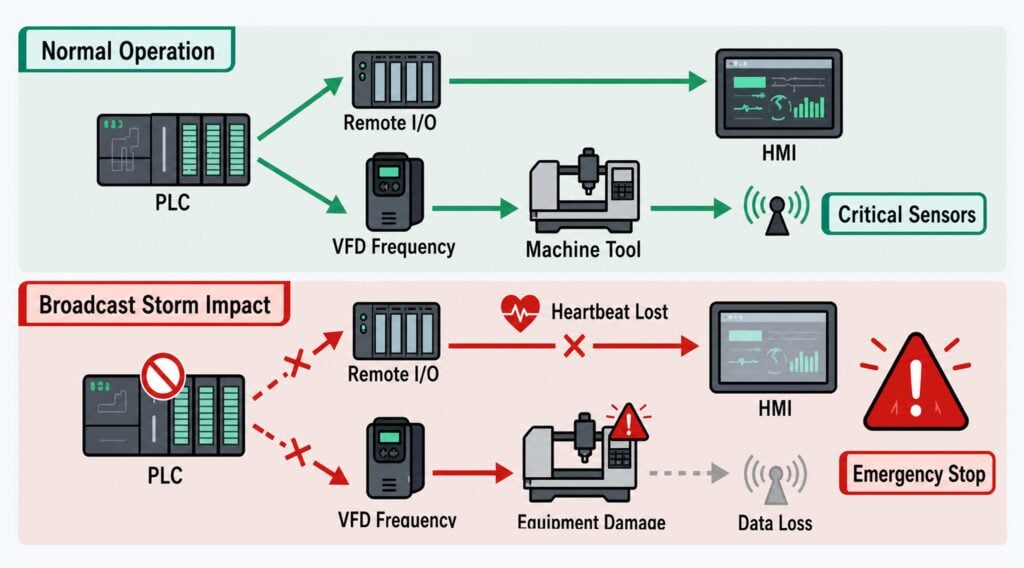
PLC and HMI Communication Delays
PLCs and HMIs rely on stable communication. When the network is flooded, data refresh may slow down or stop. Operators may see delayed values, frozen screens, or communication alarms.
SCADA Visibility Loss
A broadcast storm can prevent monitoring systems from receiving data. A North American Electric Reliability Corporation lesson learned reported that a switching loop caused a broadcast packet storm, preventing network communications from functioning and resulting in SCADA loss for several hours. The same report noted that STP is normally used to prevent switching loops from continuously propagating broadcast packets until network capacity is overwhelmed.
For power, utility, oil and gas, transportation, and smart city networks, loss of visibility can quickly become an operational concern.
Remote I/O and Field Device Disconnection
Remote I/O, drives, sensors, and controllers may appear to disconnect intermittently. Engineers may first suspect device failure, power issues, or software bugs, while the real cause is excessive Layer 2 traffic.
Difficult Troubleshooting Across Distributed Sites
Industrial networks are often physically distributed. Devices may be installed in roadside cabinets, substations, production lines, mining sites, pumping stations, or remote utility rooms.
When a broadcast storm spreads across the network, locating the original loop or faulty port can be time-consuming unless the switches provide port statistics, diagnostics, alarms, and management visibility.
How to Detect a Broadcast Storm
A broadcast storm is often visible before it is fully understood. The symptoms usually appear at both the network and application levels.
Common signs include:
- Sudden network-wide slowdown
- PLC, HMI, SCADA, or IPC communication alarms
- Switch port LEDs flashing continuously
- High broadcast or multicast counters on switch ports
- MAC address table instability
- High CPU utilization on managed switches
- Intermittent device disconnection
- Loss of remote monitoring data
- Problems appearing immediately after cabling or topology changes
A practical troubleshooting approach is to ask three questions first:
- What changed recently?
New switch, new cable, new wireless bridge, new device, or maintenance work? - Where is the broadcast traffic highest?
Check port statistics on managed switches. - Is there a Layer 2 loop?
Review redundant links, unmanaged switches, and field cabinet wiring.
If the network uses unmanaged switches only, detection becomes harder because there may be no port-level traffic counters, event logs, SNMP data, or remote diagnostics.
How to Prevent Broadcast Storms
There is no single setting that prevents every broadcast storm. Good protection comes from network design, managed switching, loop prevention, segmentation, and traffic monitoring.
1. Use Managed Industrial Ethernet Switches in Critical OT Networks
Unmanaged switches are simple and useful for small, low-risk connections. But they provide limited visibility and little protection against loops, abnormal traffic, or topology mistakes.
For critical industrial networks, managed switches are usually a better fit because they can support features such as VLAN, STP/RSTP, port mirroring, port statistics, alarms, traffic control, and diagnostics, depending on the model.
For example, Maisvch managed industrial switch models such as the MIEN5208 and MIEN6208 series list support for network management functions including MW-Ring, ERPS, STP/RSTP, VLAN, QoS, LLDP, IGMP-related functions, port mirroring, storm suppression, port statistics, diagnostics, alarms, and online system upgrades. Exact feature availability should always be checked against the specific product datasheet.
2. Enable STP, RSTP, or MSTP Where Appropriate
Spanning Tree Protocol was created to prevent Layer 2 loops by building a loop-free logical topology. RSTP improves convergence behavior compared with traditional STP, while MSTP supports multiple spanning tree instances in more complex VLAN environments.
In industrial Ethernet, STP/RSTP may be useful where redundant paths exist, but it must be configured carefully. Engineers should confirm root bridge placement, port roles, edge ports, and topology behavior during commissioning.
Do not assume that connecting two cables automatically creates safe redundancy. Without loop control, it may create the exact failure mode you are trying to avoid.
3. Use Ring Redundancy Correctly
Many industrial networks use ring topology because it provides path redundancy with efficient cabling. Protocols such as ERPS are designed for Ethernet ring protection. ITU-T G.8032 defines Ethernet ring protection switching, and ERPS is commonly used to prevent loops while providing protection switching in ring topologies.
Maisvch product pages list support for ERPS and MW-Ring on selected managed industrial switch models. This can help build resilient industrial networks, but the actual design should match the site topology, recovery requirements, and device capabilities.
4. Configure Broadcast Storm Control or Storm Suppression
Storm control, sometimes called storm suppression, limits abnormal traffic on switch ports. Depending on the switch, it may apply to broadcast, multicast, or unknown unicast traffic.
Cisco documentation explains that storm control monitors traffic entering an interface and compares it with configured thresholds. If the traffic exceeds the threshold, the switch can suppress traffic to prevent disruption.
In industrial networks, storm control should not be configured blindly. A threshold that is too high may not stop a storm early enough. A threshold that is too low may block legitimate traffic.
A better approach is to:
- Measure normal traffic during stable operation
- Identify port roles, such as uplink, PLC port, HMI port, camera port, or gateway port
- Apply different thresholds based on the role of each port
- Test the configuration before deployment
- Review alarms and traffic counters after commissioning
Storm control reduces impact. It does not replace proper loop prevention.
5. Segment the Network with VLANs
VLANs reduce the size of broadcast domains. This helps prevent one broadcast problem from affecting the entire industrial network.
For example, a factory may separate:
- PLC and remote I/O traffic
- HMI and engineering workstation traffic
- Industrial camera traffic
- SCADA uplink traffic
- Maintenance or remote access traffic
VLAN design should reflect the control architecture. The goal is not to create complexity for its own sake, but to keep faults contained and traffic predictable.
Maisvch Layer 3 switch highlights VLAN capabilities for network segmentation and traffic management in industrial networks.
6. Monitor Traffic and Keep Topology Documentation Updated
Broadcast storm prevention is not only a switch configuration task. It is also an operational discipline.
Good OT network practice includes:
- Updated topology diagrams
- Port labels in field cabinets
- Change records for cabling work
- SNMP or syslog monitoring where supported
- Port traffic baselines
- Alarm rules for abnormal traffic
- Periodic review after expansion or maintenance
A broadcast storm is often triggered by a small change. Good documentation makes that change easier to find.
Broadcast Storm Prevention Checklist for OT Engineers
Use this checklist during design, commissioning, or troubleshooting:
- Avoid unmanaged switches in critical redundant paths
- Enable STP/RSTP/MSTP where redundant Layer 2 paths exist
- Use ERPS or industrial ring protocols for ring topologies where supported
- Segment large networks with VLANs
- Configure storm suppression or storm control on access ports
- Check normal broadcast and multicast baselines before setting thresholds
- Review port statistics after adding new devices
- Label all switch ports and field cables
- Document temporary maintenance connections
- Monitor switch logs, alarms, and traffic counters
- Verify that wireless bridges or fiber links do not create unexpected loops
- Test failover behavior before putting the network into production
Where Maisvch Industrial Switches Fit
Broadcast storm prevention depends on both design and hardware capability. In industrial environments, switches also need to operate reliably under temperature variation, electrical noise, vibration, and distributed installation conditions.
Maisvch provides industrial communication products including industrial Ethernet switches, PoE switches, wireless APs, serial-to-Ethernet converters, and 4G/5G routers for manufacturing, energy, automation, and Industry 4.0 applications.
For broadcast storm prevention and industrial network reliability, selected Maisvch managed industrial Ethernet switches provide features such as STP/RSTP, VLAN, ERPS, MW-Ring, QoS, LLDP, IGMP Snooping, SNMP, port mirroring, storm suppression, port statistics, diagnostics, and alarm notification. Feature support varies by model, so engineers should confirm the exact configuration in the product datasheet before deployment.
A well-designed industrial Ethernet network should not rely on one feature alone. The more reliable approach is to combine:
- Managed industrial switches
- Correct topology design
- Loop prevention protocols
- VLAN segmentation
- Storm suppression
- Port monitoring
- Clear field documentation
Together, these practices help reduce the chance that one cabling error, faulty device, or misconfigured link can affect the entire OT network.
FAQ
1. What is a broadcast storm?
A broadcast storm is a condition where excessive broadcast traffic floods a network, consuming bandwidth and device resources. In severe cases, normal communication may slow down, become unstable, or stop.
2. What causes a broadcast storm?
Common causes include Layer 2 loops, incorrect cabling, misconfigured redundant links, faulty devices, excessive discovery traffic, and large flat networks without segmentation.
3. Can a network loop cause a broadcast storm?
Yes. A Layer 2 loop can cause broadcast frames to circulate repeatedly between switches. This can quickly multiply traffic and overwhelm the network.
4. How do you detect a broadcast storm?
Look for sudden network slowdown, continuously flashing switch port LEDs, high broadcast counters, MAC address instability, switch CPU spikes, and device communication alarms. Managed switches make detection much easier because they provide port statistics, logs, and diagnostics.
5. How do you prevent broadcast storms?
Use managed switches, enable loop prevention protocols such as STP/RSTP or ERPS where appropriate, segment the network with VLANs, configure storm suppression, monitor traffic, and keep network topology documentation updated.
6. What is broadcast storm control on a switch?
Broadcast storm control is a switch feature that limits excessive broadcast traffic on a port. Some switches also support multicast and unknown unicast storm control. It helps reduce the impact of abnormal traffic but should be used together with proper loop prevention.
7. Do VLANs prevent broadcast storms?
VLANs do not completely prevent broadcast storms, but they limit the broadcast domain. This means a storm inside one VLAN is less likely to affect unrelated parts of the network.
8. Can unmanaged switches cause broadcast storms?
An unmanaged switch does not “cause” a storm by itself, but it usually lacks loop prevention, traffic control, diagnostics, and monitoring. If a loop is created through unmanaged switches, the network may have little protection or visibility.
9. Why are broadcast storms especially dangerous in industrial Ethernet?
Industrial Ethernet often carries data for PLCs, HMIs, SCADA systems, remote I/O, drives, cameras, and edge devices. A broadcast storm can interrupt control communication, monitoring, or production operations.
A broadcast storm is one of those network problems that can start from a small mistake and grow quickly. One extra cable, one unmanaged switch, one misconfigured redundant link, or one faulty device may be enough to disrupt an industrial Ethernet network.
The best defense is not a single feature. It is a design approach.
For OT networks, broadcast storm prevention should combine managed industrial switches, loop prevention, VLAN segmentation, storm suppression, traffic monitoring, and disciplined field documentation. With the right architecture and the right switch capabilities, industrial networks can remain stable even as devices, production lines, and remote sites continue to expand.