The switch had been running for 18 months when the ambient temperature in Cabinet 4 hit 71°C during a July heatwave. No alarm. No warning. Just a dead port — and a halted conveyor line in a pharmaceutical tablet coating facility in Southeast Asia. Post-mortem: the switch was rated to 55°C. The integrator had chosen it because it was on the approved vendor list for the previous project. That project ran in an air-conditioned server room.
When engineers ask what specifications to prioritize in an industrial ethernet switch buyer guide, the honest answer is: the ones that map to your actual operating environment, not the ones printed largest on the datasheet. Spec sheets are written by marketing teams. Failure modes are written by physics. A switch that survives five years in a production cabinet is distinguished from one that fails in six months by roughly a dozen parameters — most of which are listed in fine print, mislabeled, or omitted entirely.
Why Choosing an Industrial Ethernet Switch on Price and Port Count Costs More Later
Specifying an industrial ethernet switch correctly means evaluating operating temperature range, MTBF, redundancy protocol, power input architecture, ingress protection rating, and security compliance level—not just port count and throughput.
The right switch for a factory floor looks nothing like the right switch for an office IT rack, and treating them as interchangeable is the single most common cause of premature field failures we see across manufacturing deployments.
Most switch selection decisions start with a spreadsheet: port count, PoE budget, managed or unmanaged, price. Those parameters matter. But they’re also the easiest to get right because they’re the ones everyone knows to check.
The specs that cause field failures are the ones that never make it into the initial RFQ.
The financial fallout of getting those secondary specs wrong is severe. According to the 2024 Hourly Cost of Downtime Survey by research firm ITIC, a single hour of unplanned downtime now costs upwards of $300,000 for over 90% of mid-size and large enterprises. When the penalty for an idle production line is that steep, “saving” $150 on an underspecified commercial-grade switch is a catastrophic miscalculation. As Ethernet connectivity expands across the plant floor, the failure rate from misspecified hardware—particularly temperature-related failures in sealed cabinets and vibration damage in mobile equipment—is accelerating.
Consider a lead electrical engineer at a food processing equipment OEM in Germany who described a project where 24 switches were installed across a washdown-environment packaging line. All 24 were standard commercial managed switches rated to IP20.
Within 14 months, seven had failed due to condensation ingress during daily CIP (clean-in-place) washdown cycles. Replacing them mid-project cost €18,000 in parts and three days of line stoppage.
“We had specified the right protocol features,” the engineer said. “We just hadn’t looked at the enclosure rating column.”
The cabinet temperature problem is particularly deceptive. A switch rated to 55°C sounds reasonable until you realize that a sealed machine cabinet in direct sunlight—with a servo drive, a PLC, and a 24V power supply all running inside it—routinely hits 65°C to 75°C ambient in summer.
At that point, a 55°C-rated switch is already operating entirely outside its design envelope. It won’t fail immediately. It will degrade. MTBF drops sharply above the rated temperature; every 10°C above spec roughly halves the component lifetime in electrolytic capacitors.
That spec gap is where most switch failures originate. Not from protocol errors. Not from configuration mistakes. From a temperature rating that was never properly matched to the installation environment.
The 12 Industrial Ethernet Switch Specifications That Separate Field Survivors from Early Failures
Twelve specifications consistently separate switches that run for five or more years in production environments from those that require replacement within 18 months. They fall into four categories: environmental hardening, network resilience, power architecture, and security posture.
| Specification | Commercial Switch | Entry Industrial Switch | Purpose-Built Industrial Switch |
| Operating Temperature | 0°C to 40°C | -10°C to 60°C | -40°C to 75°C (or 85°C) |
| MTBF | ~30,000 hrs | ~80,000 hrs | >200,000 hrs |
| Ingress Protection | None / IP20 | IP30 | IP40–IP67 (application-specific) |
| Ring Redundancy | None | RSTP (>1s) | RSTP <50ms / ERPS / MRP |
| Power Input | Single AC | Single 12–24V DC | Dual DC redundant, 9–60V range |
| Management Protocol | HTTP/HTTPS only | SNMP v1/v2c | SNMP v3, RMON, NETCONF |
| Security Standards | None | Basic ACL | ISA/IEC 62443-4-2 aligned |
| Vibration Rating | None | IEC 60068 partial | IEC 60068-2-6, IEC 60068-2-27 |
| Surge Protection | None | 2kV burst | 4kV burst / 6kV surge (EN 61000-4-5) |
| Coating / Humidity | None | Standard PCB | Conformal coating, 5–95% non-condensing |
| Port Types Available | RJ45 only | RJ45 + 1 SFP | RJ45 + SFP + M12 options |
| Warranty / Support | 1 year limited | 1–2 year | 5-year repair, lifetime maintenance |
1–3: Environmental Hardening
Operating temperature range is the most commonly misread spec on a switch datasheet. ‘Industrial grade’ is not a defined standard — any manufacturer can print it. What you need is a specific range. For machine cabinet deployment in factories without climate control, specify -40°C to 75°C minimum. For food and pharmaceutical environments where washdown occurs, add IP40 or higher ingress protection. For outdoor enclosures or mobile equipment, consider IP67.
What most datasheets don’t tell you is that the temperature rating on a switch refers to ambient air temperature at the chassis, not the temperature inside the cabinet. Cabinet internal temperature is routinely 15°C to 25°C above ambient room temperature due to heat generated by other equipment. A switch rated to 60°C in a cabinet that runs 25°C above a 45°C summer ambient is already being operated outside spec by 10°C. Derate accordingly, or specify a higher range from the start.
MTBF (Mean Time Between Failures) figures on datasheets are often calculated under MIL-HDBK-217 at 25°C. A switch showing 500,000-hour MTBF at 25°C may have an effective MTBF below 200,000 hours at 65°C operating temperature. Ask vendors for MTBF figures at your actual operating temperature, not at the standard test condition. For reference, purpose-built industrial switches from reputable manufacturers typically publish MTBF figures above 200,000 hours across the full rated temperature range.
Vibration and shock ratings matter more than most engineers expect, even in ‘stationary’ factory environments. CNC machines, punch presses, and compressors transmit vibration through floors and into cabinet mounting rails. Look for IEC 60068-2-6 (sinusoidal vibration) and IEC 60068-2-27 (shock) compliance as a minimum. For rail or mobile applications, EN 50155 covers the full environmental test suite required for rolling stock.
4–6: Network Resilience
Ring redundancy protocol and recovery time matter in any topology where a single link failure can halt a production line. Standard RSTP (802.1w) reconverges in 1–30 seconds — which is acceptable for office IT but causes a PLC watchdog timeout in most motion control applications. Purpose-built industrial switches support RSTP with <50ms recovery, or dedicated industrial ring protocols: ERPS (G.8032) with <50ms recovery, or MRP (IEC 62439-2) which targets <200ms. Specify the recovery time your application can tolerate, then verify the switch meets it at your network ring size.
Dual power input with independent supply paths is non-negotiable for any critical network node. A single-input switch fails completely when its power supply fails. Dual-input switches — typically accepting 9–60V DC redundant inputs — maintain operation when one supply source is lost or during a PSU swap. This is a $15 design decision that eliminates an entire category of single-point failures.
Surge protection levels reflect real installation realities in industrial sites. EN 61000-4-5 defines the test levels: Level 3 (1kV/2kV) is typical for commercial switches; purpose-built industrial switches specify 4kV burst / 6kV surge protection on power and signal ports. In facilities with large motors, welding equipment, or power distribution switching, this difference determines whether a nearby fault event takes out a single fuse or an entire cabinet’s worth of network equipment.
7–9: Management and Security
For any managed switch on a converged OT/IT network, verify that the management interface supports SNMPv3 (not just v1/v2c). SNMP v1 and v2c transmit community strings in plaintext — a significant vulnerability on any network where IT traffic co-runs with OT control traffic. SNMPv3 adds authentication and encryption. The standard relevant here is ISA/IEC 62443-4-2, which defines component-level security requirements for industrial automation and control systems. Specify that your switch vendor declares compliance with this standard’s relevant requirements.
Port security and storm control are often overlooked because they’re less visible than VLAN or QoS features. MAC address limiting per port, 802.1X authentication, and broadcast storm control thresholds all become critical when a compromised device — a misconfigured laptop plugged into a maintenance port, or a device with malware — is introduced to the network.
NETCONF/YANG support is increasingly required for integration with automated network management and OT security monitoring platforms. If your customer is running a SIEM or NOC that ingests network telemetry, SNMP traps alone are insufficient. NETCONF with YANG data models provides structured, programmable access to switch state.
10–12: Form Factor and Lifecycle
DIN-rail vs rack-mount mounting determines your physical installation options. Machine cabinet panels in OEM equipment are almost universally DIN-rail. Rackmount switches belong in purpose-built network cabinets — which may not exist in your customer’s facility at all. Specify DIN-rail for machine-level installations. Specify 19-inch rack-mount for plant-level aggregation nodes in a communications room.
Port type mix and SFP options affect future-proofing. Copper RJ45 handles 95% of machine-level connections at Gigabit speeds. Fiber SFP ports are needed where cable runs exceed 100m or where electrical isolation between buildings is required. M12 connectors (D-coded for data, X-coded for 10G) are required in food, pharmaceutical, and outdoor applications where IP67 ratings are mandatory — a standard RJ45 connector will not achieve IP67 regardless of the switch’s chassis rating.
Warranty and long-term support policy are vendor-evaluation criteria, not just purchasing administration. A switch deployed in a machine that ships to a customer in 2025 will be in the field until 2035 or beyond. If the vendor discontinues the product in 2027, your customer is left managing obsolete spares. Specify a minimum 5-year repair commitment and lifetime maintenance availability. Maisvch’s industrial ethernet switch portfolio includes 5-year warranty, and lifetime maintenance policy as standard across all product lines.
How to Choose Between Managed and Unmanaged Industrial Switches: A 5-Step Evaluation
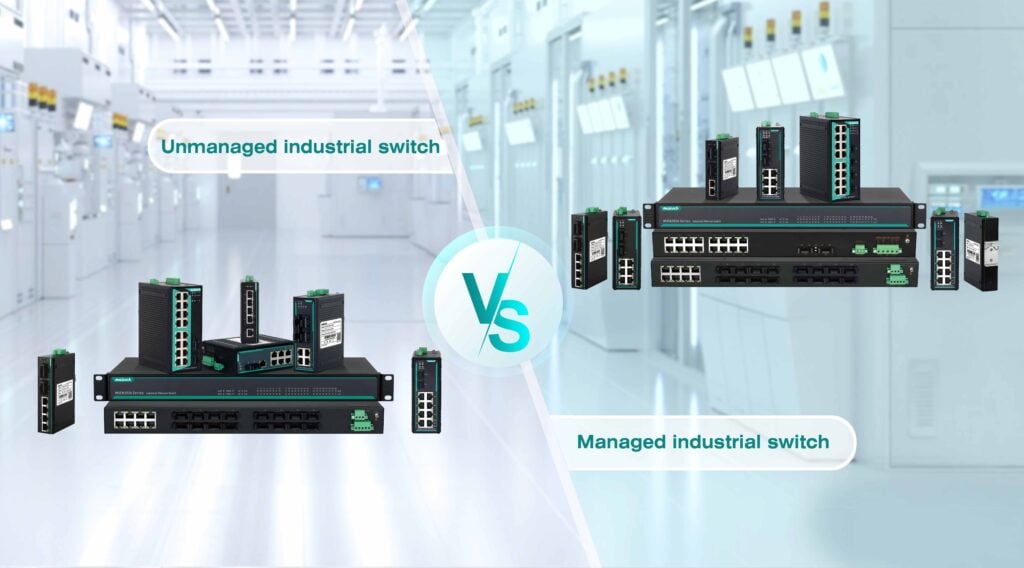
The managed vs unmanaged industrial switch decision is the first fork in the specification process. Here is the evaluation framework we recommend before any vendor shortlisting.
| Feature | Unmanaged Switch | Managed Switch |
| Configuration | None — plug and play | Full CLI / Web / SNMP / NETCONF |
| VLAN / QoS | No | Yes (802.1Q VLAN, 802.1p priority) |
| Ring Redundancy | No | Yes (RSTP, ERPS, MRP) |
| Fault Diagnostics | Port LEDs only | RMON, SNMP traps, port mirroring |
| Security | No port isolation | 802.1X, ACL, RADIUS, storm control |
| Suitable for | Simple point-to-point links | Any networked production system |
- Map your fault-tolerance requirement. If a single link failure halting a production line is unacceptable, you need ring redundancy — which requires managed switches. If the network segment is a simple point-to-point device connection with no ring topology, unmanaged may be appropriate.
- Identify your cabinet thermal environment. Measure peak ambient temperature inside your target cabinet during summer operation with all equipment running. If it exceeds 55°C, eliminate any switch not rated to at least 70°C. If it exceeds 65°C, narrow to -40°C to 75°C or better.
- Determine ingress protection requirements. Any installation where liquid (including condensation from CIP washdown or temperature cycling) can contact the switch enclosure requires minimum IP40. For direct washdown exposure, IP67. For hazardous area or outdoor exposure, confirm the specific IEC 60529 rating and verify the connector type supports it.
- Check the security standard requirement. If your machine ships to pharmaceutical or food customers in the EU or North America, ask whether their facility security policy references ISA/IEC 62443. If it does, your switch must support SNMPv3, 802.1X, port ACLs, and preferably declare 62443-4-2 component compliance.
- Verify lead time and regional support availability. This is the step most engineers skip until it burns them. For a 16-week project timeline, a vendor with 8-week standard lead time gives you zero margin. Ask for documented standard lead time, expedite options, and regional stocking availability before shortlisting. A technically superior switch from a vendor with a 12-week lead time can wreck a project schedule.
The honest answer is that for a simple 4-port sensor-to-PLC connection with no ring topology, security requirements, or diagnostics needs, a quality unmanaged switch is entirely appropriate and over-specifying a managed switch adds cost without benefit. If your application has only device connections with no uplink ring, fixed topology, and no IT convergence requirements — use unmanaged. Reserve managed switches for any node that sits in a ring, handles multiple VLANs, or needs remote diagnostics.
Frequently Asked Questions About Industrial Ethernet Switch Specifications
What specifications should I look for in an industrial Ethernet switch?
Prioritize operating temperature range (minimum -40°C to 75°C for cabinet deployment), MTBF above 200,000 hours at operating temperature, ring redundancy with <50ms recovery, dual DC power inputs, ingress protection rating matched to your environment (IP40 minimum for light washdown), and security compliance with ISA/IEC 62443-4-2 for any converged OT/IT application.
How is an industrial ethernet switch different from a commercial switch?
Industrial switches are purpose-designed for harsh environments: wider temperature ranges (-40°C to 75°C vs 0–40°C for commercial), conformal-coated PCBs, dual DC power inputs, DIN-rail mounting, vibration and shock certification to IEC 60068, and ring redundancy protocols. Commercial switches lack most of these. Specifying a commercial switch for a factory cabinet to save $150 per unit is the most reliable way to spend $15,000 on an emergency field service call 18 months later.
Managed vs unmanaged industrial switch: which should I choose?
Use unmanaged switches for simple, fixed-topology device-to-PLC connections where diagnostics, ring redundancy, VLAN segmentation, and security are not required. Use managed switches for any node in a ring topology, any network segment requiring VLAN separation, any application with remote fault diagnostics requirements, and any installation that must comply with ISA/IEC 62443 security standards.
What does industrial ethernet switch temperature rating actually mean?
The rated temperature refers to ambient air temperature at the switch chassis — not room temperature and not cabinet internal temperature. Cabinet internal temperature is typically 15°C to 25°C above room ambient with active equipment running. A switch rated to 60°C installed in a cabinet whose internal temperature reaches 70°C in summer is being operated 10°C outside specification. Select a switch rated at least 15°C above your worst-case cabinet internal temperature measurement.
What is ERPS and why does it matter for industrial networks?
ERPS (Ethernet Ring Protection Switching, ITU-T G.8032) is a ring redundancy protocol that achieves <50ms failover when a ring link or node fails. Standard RSTP (802.1w) takes 1–30 seconds to reconverge, which triggers PLC watchdog timeouts in most motion control and process control applications. If your network uses a ring topology and link failure cannot halt the production process for more than a few hundred milliseconds, specify ERPS or MRP rather than standard RSTP.
What lead time should I budget for industrial switches?
Standard lead times for industrial ethernet switches range from 2 to 12 weeks depending on vendor, model, and regional stocking position. For project timelines under 16 weeks, verify the vendor’s documented standard lead time and expedite options before finalizing the BOM. A vendor with 8-week standard lead time and no regional stocking gives zero schedule margin on a 16-week project — a fact that surfaces painfully at the point of order, not at the point of specification.
Start with the Right Spec Sheet — Not the Cheapest Quote
Engineers who specify switches on port count and price alone will keep having the same conversation with their project managers in 18 months: why did the network fail, what will it cost to fix, and how long will the line be down. Every one of the 12 specifications in this guide has a direct line to a failure mode we’ve seen in production environments across food, pharma, and factory automation deployments in Europe and Asia-Pacific. The specification effort that prevents one unplanned downtime event pays for itself many times over. Treat the switch BOM with the same rigor as the servo drive or the PLC selection — they’re all part of the same uptime equation.
If you’re specifying industrial ethernet switches for food processing, pharmaceutical, or machine automation applications and want a structured comparison template, download the Maisvch Industrial Switch Spec Comparison Sheet — it covers all 12 parameters in this guide with fill-in fields for your operating environment. Free, no registration required.