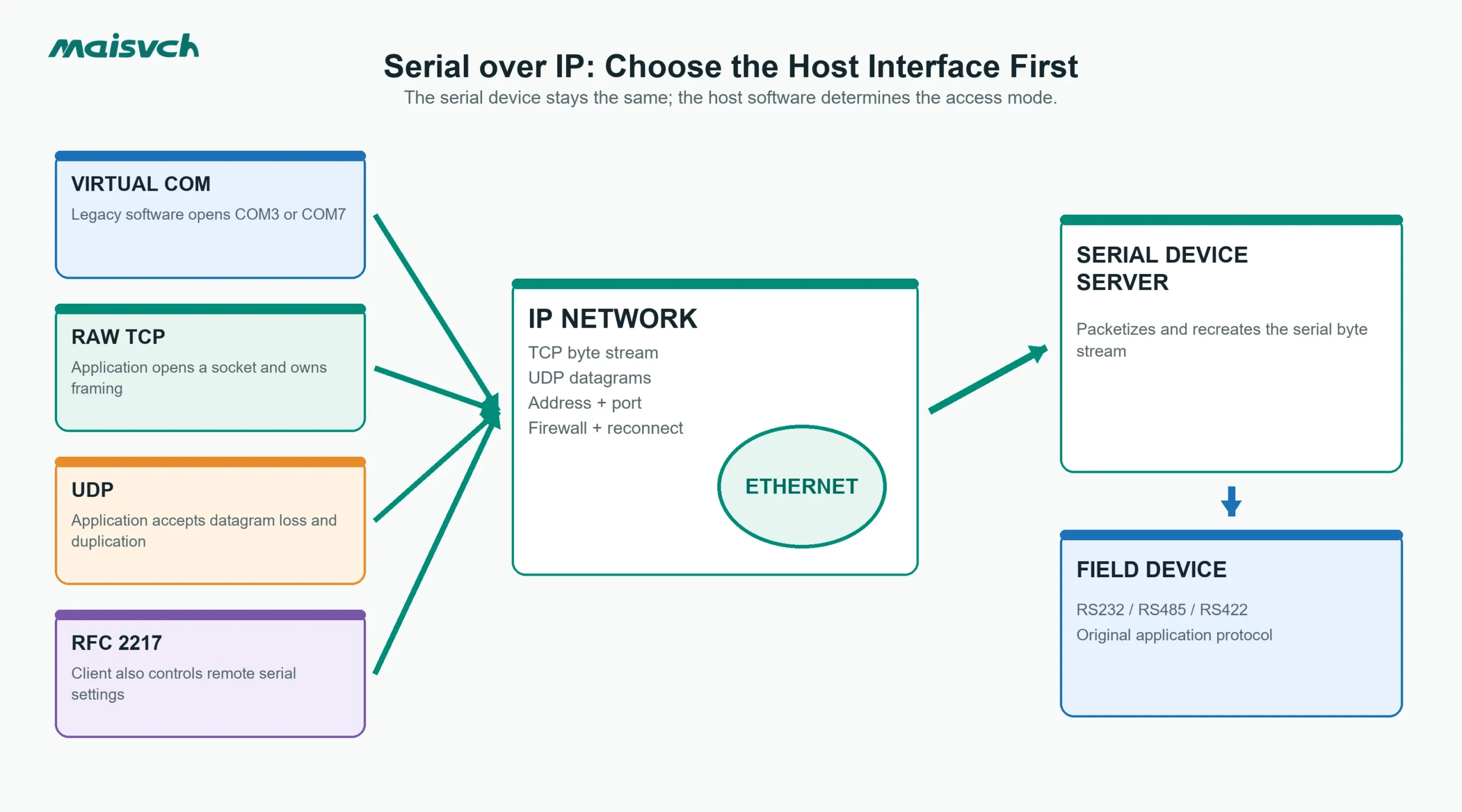
Your maintenance software still opens COM3, but the PLC or meter is now in another building. Ethernet reaches the remote cabinet; a serial cable does not. A new SCADA service could open a TCP socket, while the legacy program cannot be changed. Both can use Serial over IP, but they should not use the same access mode.
Serial over IP carries RS232, RS485 or RS422 data across an IP network. A serial device server receives bytes at a physical serial port, packetizes them for Ethernet and recreates the serial byte stream at the other end. It does not automatically translate the application protocol. Your host software, connection direction, packetization settings and failure behavior still determine whether the system works reliably.
| What your host can open | Suitable starting mode | What you must confirm |
|---|---|---|
| Only a Windows or Linux COM port | Virtual COM | Driver and OS support, COM assignment, reconnect behavior |
| A TCP socket | Raw TCP Client or TCP Server | Which side initiates, listening port, one-owner policy |
| A UDP socket | UDP | Peer addressing, loss/duplication handling, message boundaries |
| A Telnet/RFC 2217 client | RFC 2217, if both ends support it | Remote baud/parity/control support and security boundary |
| Another serial device server | Paired serial tunnel | Matching serial settings, peer IP/port and outage recovery |
What Serial over IP Carries — and What It Does Not
At the serial side, your device still expects its original electrical interface, baud rate, data bits, parity and stop bits. Its application message might be Modbus RTU, a proprietary ASCII command or a vendor-specific binary frame. Serial over IP transports those bytes; it does not make an RS485 device speak Ethernet or turn a proprietary protocol into Modbus TCP.
The distinction matters during commissioning. An Ethernet link LED proves only that a physical network link exists. A TCP connection proves only that two sockets are connected. Neither proves that the correct serial settings, frame timing or request/response ownership exist.
If you need the device-category definition first, read what is a serial device server. The rest of this guide assumes you already have a serial endpoint and need to choose how the application reaches it.
Choose the Serial over IP Mode From the Host Application
Virtual COM keeps a legacy COM-port workflow
A Virtual COM driver creates a local port such as COM7 on the host. The legacy application opens that port as if the device were connected locally. The driver sends the serial data through IP to the device server.
Choose Virtual COM when the application cannot open a socket and changing it would be costly or risky. Before approval, verify:
- The driver supports your Windows or Linux version and deployment policy.
- COM-port assignments remain stable after restart, update and hardware replacement.
- The driver reconnects after a network break without requiring an operator login.
- One application has exclusive write ownership when the serial protocol expects one master.
- The driver exposes the serial controls the application actually changes.
Virtual COM reduces application changes, but it adds a driver lifecycle. An operating-system update, unsigned driver policy or duplicate COM assignment can become an operational dependency that a raw socket design does not have.
Raw TCP suits software that already owns the serial protocol
Use Raw TCP when your application can open a socket and already builds the serial messages. The socket carries an ordered stream of bytes between the application and the serial device server.
TCP is a reliable, ordered byte stream, as defined in RFC 9293. It does not preserve the write boundaries created by your application. Two short writes can arrive in one TCP segment, and one long write can be delivered in several reads. Your application or the device server must identify complete serial messages from protocol rules, timing or a configured packetization condition.
This is the usual fit for a custom SCADA driver, middleware service or edge application that can manage connections directly. It also removes the Virtual COM driver from the host, which can simplify deployment across containers, virtual machines or non-Windows systems.
UDP preserves datagrams but not delivery
UDP carries discrete datagrams, which can help when the application already treats each payload as a complete message. However, RFC 768 does not provide delivery, duplicate protection, ordering or connection-state guarantees.
Use UDP only when the application can tolerate or detect loss and duplication, or when low-overhead one-to-many delivery is a defined requirement. A request/response control command should not be moved to UDP merely because configuration appears simpler.
RFC 2217 adds remote serial-port control
RFC 2217 defines a Telnet option for controlling serial-port parameters and modem signals remotely. It can be useful when a client must change baud rate, parity or control lines during operation rather than use one fixed server configuration.
Support must exist at both ends. Confirm which controls the implementation exposes; “RFC 2217 compatible” should not be treated as proof that every modem signal or break condition behaves exactly like a local UART. Because Telnet-era mechanisms do not create an OT security boundary, place the service inside an appropriately segmented and controlled network.
TCP Client or TCP Server Defines Who Initiates the Connection
These labels describe the network session, not the importance of each machine.
- In TCP Server mode, the serial device server listens on a configured port. The host application connects to its IP address and port.
- In TCP Client mode, the serial device server initiates an outbound connection to a configured host IP address and port.
TCP Server mode is often easier on a flat plant LAN because the host knows the device server address. TCP Client mode can help when the remote site permits outbound connections but blocks unsolicited inbound sessions. It can also centralize many remote endpoints on one listening service.
Do not select the direction by habit. Write down the firewall owner, address stability, NAT path and reconnect owner. If both ends wait for an inbound session, nothing connects. If both ends try to connect to the wrong port, a ping test still passes while the application times out.
Build a Port Map Before You Configure Devices
A one-page worksheet prevents most address and session mistakes.
| Field | Example | Project decision |
|---|---|---|
| Serial endpoint | Energy meter 12 | Device name and cabinet |
| Electrical interface | RS485 two-wire | RS232, RS485 or RS422; pinout and polarity |
| Serial format | 9600, 8E1 | Baud, data bits, parity, stop bits |
| Application protocol | Modbus RTU | Protocol and device address |
| Host interface | Raw TCP | Virtual COM, TCP, UDP or RFC 2217 |
| Connection direction | Device server listens | Which endpoint initiates |
| IP and port | 10.20.4.31:4001 | Address, port and firewall rule |
| Session owner | SCADA driver A | Who may issue requests or writes |
| Packetization | 4 ms idle gap | Idle time, delimiter or length rule |
| Reconnect rule | Retry every 5 s | Backoff, alarm and operator action |
| Offline data rule | Drop incomplete frame | Buffer, discard or replay policy |
Use a unique listening port for each serial channel when one IP address exposes several ports. Document the mapping in the SCADA database and network configuration; do not leave it only in an installer’s laptop.
Packetization and Timeouts Must Fit the Serial Protocol
The device server has to decide when a sequence of incoming serial bytes is ready to send as an IP payload. Common triggers include an idle-time gap, a maximum byte count, a delimiter or a combination of conditions.
An aggressive packetization timeout reduces latency but may create many small packets. A long timeout reduces packet count but can consume the response budget of a legacy application. A delimiter works only when the protocol has an unambiguous delimiter that cannot appear inside the payload.
Test the complete timing chain:
- Host application request timeout.
- Network transit and queue time.
- Device-server packetization delay in each direction.
- Serial transmission time at the configured baud rate.
- Device processing time.
- Retry and reconnect delay after a failure.
TCP retransmission protects the byte stream from ordinary packet loss, but it can also extend delay. A connected socket is not proof that the response will arrive before the PLC or SCADA timeout.
Multiple TCP Connections Do Not Create Multiple Safe Serial Masters
A product may accept several TCP clients. That describes network connectivity, not the application’s right to control one half-duplex RS485 bus.
If two clients can send at the same time, answer these questions before deployment:
- Are client payloads queued as complete transactions or simply merged into one byte stream?
- Can one client receive a response caused by another client’s request?
- Are writes restricted to one owner?
- What happens to queued data when a client disconnects?
- Is there a queue limit and an observable overflow alarm?
- Does a silent serial device block every connected client until timeout?
For request/response protocols, assign one polling owner unless the product documents protocol-aware arbitration. Let other systems consume data from the SCADA or middleware layer instead of adding independent writers to the same serial line.
Define Reconnect and Buffered-Data Behavior Before a Network Failure
“Automatic reconnect” is incomplete unless you know what happens to data created during the outage.
Consider a remote pump command sent as the network fails. If the server buffers the command and replays it after reconnection, the command may be stale. If it discards the command silently, the host may believe it was delivered unless the application has a transaction acknowledgement. If both host and server retry, the device may receive a duplicate command.
Specify:
- Whether incomplete serial or IP payloads are discarded.
- Whether complete outbound messages are buffered, and for how long.
- Whether buffers survive a device restart.
- How duplicate requests are detected at the application layer.
- Which endpoint reconnects and what backoff it uses.
- What alarm shows that the serial endpoint is offline even when Ethernet remains up.
Treat Serial over IP as an OT Network Service
Moving a serial connection onto Ethernet expands the path from one cable to switches, routing, firewall rules and host services. Apply the same inventory, segmentation, access control, patching and logging discipline used for other OT assets. NIST SP 800-82 Rev. 3 provides OT security guidance that can be applied to this boundary.
Do not expose a raw serial service directly to the public internet. When a remote connection crosses an untrusted network, use an approved secure network architecture such as a managed VPN or protected OT access gateway, and restrict source addresses and ports. Security controls must be tested with the same reconnect and latency requirements as the data path.
Run a Failure-State Acceptance Test
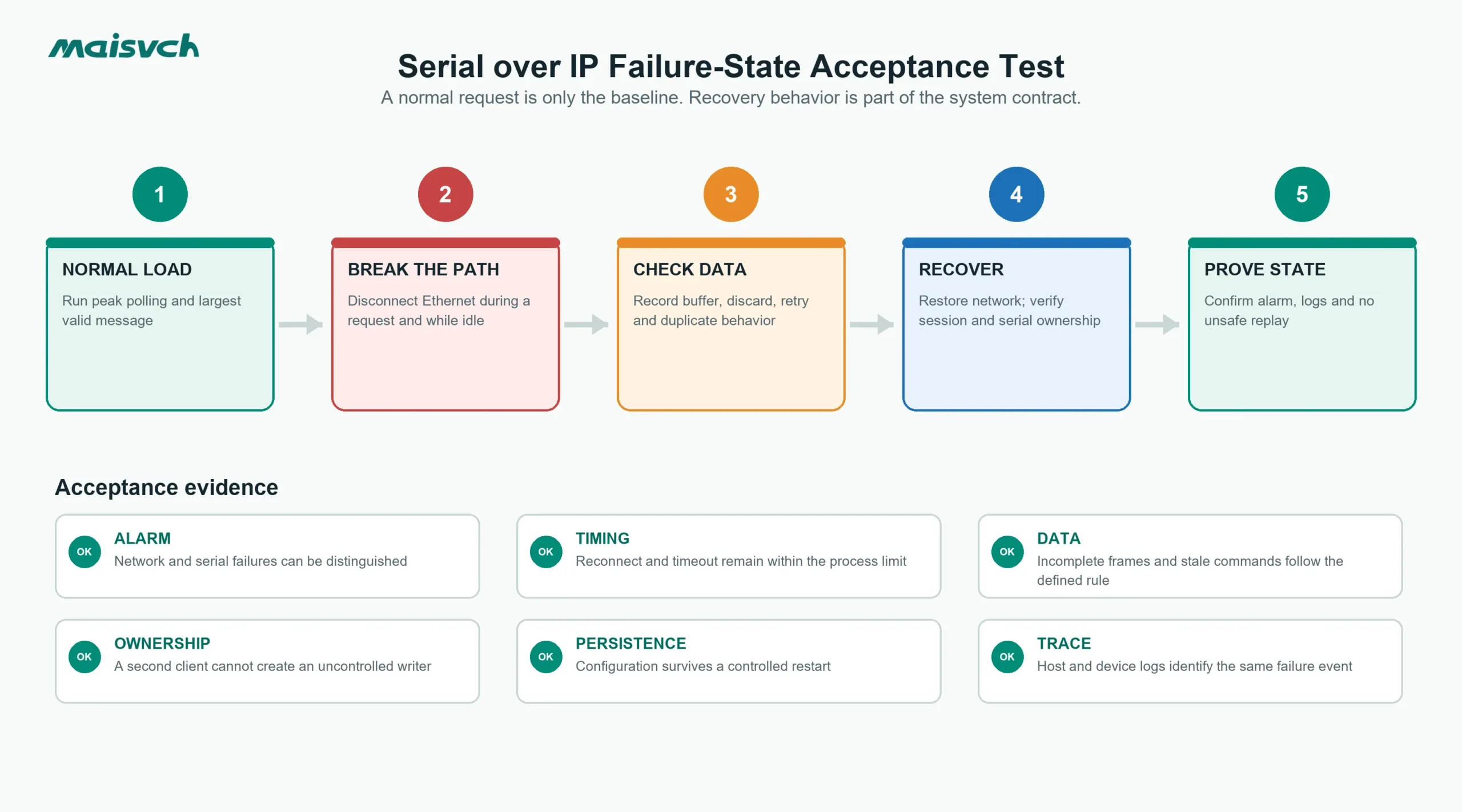
Use a representative serial device, the real host software and production-equivalent network policies. Record packet captures and application logs where permitted.
| Test | Action | Acceptance evidence |
|---|---|---|
| Normal traffic | Run the highest expected polling or message rate | No frame errors, missed responses or timeout drift |
| Ethernet loss | Disconnect the network during a request and during idle time | Defined alarm, no unsafe replay, automatic or documented recovery |
| Serial loss | Open one serial conductor or power off the endpoint | Serial failure is distinguishable from network failure |
| Host restart | Restart the application or operating system | Port/session returns without duplicate ownership |
| Device-server restart | Cycle power under controlled conditions | Configuration persists and session recovers as specified |
| Slow or silent device | Delay or suppress one serial response | Queue and timeout behavior remain bounded |
| Two-client attempt | Connect a second authorized test client | Ownership, rejection or arbitration matches the design |
| Maximum message | Send the largest valid frame at the required rate | No truncation, split-frame error or buffer overflow |
Where a Maisvch Serial Server Fits
The serial server range provides industrial Serial-over-IP options for RS232, RS485 and RS422 applications. Model selection should begin with serial-port count, electrical interface, isolation, power input, operating temperature and the software mode your host requires.
For example, the Mport3101 serial server provides one selectable RS232/RS485/RS422 serial port and 100M Ethernet. Its documented modes include TCP Client, TCP Server, UDP and Virtual Serial, and its specified DC 9–36 V input, IP40 enclosure and -40 to +85 °C operating range target industrial installations. These specifications establish the available paths; they do not replace your test of client count, packetization, reconnect and application timing.
If the number of ports, isolation or mounting is still undecided, use the separate guide on how to choose a serial device server.
Information to Send Before You Request a Configuration
Provide the following with your inquiry:
- Host software and operating system.
- Whether the host opens a COM port, TCP socket, UDP socket or RFC 2217 session.
- RS232, RS485 or RS422 interface and exact wiring.
- Baud rate, data bits, parity, stop bits and flow control.
- Application protocol and one representative request/response frame.
- Number of serial ports, host clients and remote sites.
- TCP Client/Server direction, addressing, firewall and NAT constraints.
- Required packetization, timeout, reconnect and offline-data behavior.
- Isolation, power input, temperature and mounting requirements.
This information lets the supplier recommend an operating mode and test plan rather than only match a connector count.
Serial over IP FAQ
Is Serial over IP the same as Modbus TCP?
No. Serial over IP can carry Modbus RTU bytes transparently, but native Modbus TCP uses an MBAP header and different transport framing. A Modbus gateway is required when the host and field device use different Modbus transports.
Can two computers use the same remote serial port?
They may be able to establish two network connections, but that does not prove both can safely send requests or writes. Confirm queueing, response routing and write ownership. For most request/response serial buses, use one polling owner.
Does TCP make a serial protocol reliable over any network?
TCP provides ordered, reliable byte delivery while the connection is operating. It does not guarantee application deadlines, preserve serial-message boundaries, define reconnect behavior or prevent stale and duplicate commands. Those properties require application and device-server design plus testing.
When should you avoid Virtual COM?
Avoid it when the operating system or driver lifecycle is unacceptable, when the application can use sockets directly, or when a service/container architecture cannot depend on a local COM-port driver. Use it when an unchanged legacy application genuinely requires a COM port and the driver can be supported for the project life.