An Ethernet switch may look like a modest part of an automation system, but it often carries traffic for PLCs, HMIs, drives, remote I/O, cameras, wireless access points, edge gateways, SCADA servers, and engineering workstations at the same time. If that switch stops forwarding traffic, several otherwise healthy devices can become unreachable together.
That is why an industrial Ethernet switch should not be selected by port count alone. The right device must fit the topology, traffic pattern, power system, installation environment, maintenance model, and failure-recovery requirements of the application.
This guide explains how industrial Ethernet switches work, how they differ from office switches, which types are available, and how to turn a project requirement into a practical switch specification.
What Is an Industrial Ethernet Switch?
An industrial Ethernet switch connects Ethernet devices and forwards frames between its ports. Its basic switching role is familiar, but its mechanical, electrical, thermal, and management design is intended for industrial or infrastructure environments.
Depending on the model, an industrial network switch may provide:
- – Rugged metal construction and industrial mounting options
- Wide operating temperature capability
- Redundant DC power inputs
- Copper, fiber, or mixed port configurations
- Managed functions such as VLAN, QoS, SNMP, access control, and port diagnostics
- Ring or spanning-tree redundancy
- Power over Ethernet for cameras, wireless APs, and other powered devices
- Industry-specific connectors, timing features, or certifications
These are not universal features. An unmanaged five-port DIN-rail switch and a Layer 3 rack-mounted aggregation switch belong to the same broad product family, yet they solve very different problems. Always verify the exact model and revision against its current datasheet.
The underlying Ethernet technologies are developed within the IEEE 802.3 Ethernet Working Group. Industrial switches use those standardized Ethernet interfaces while adding hardware and software suited to operational technology networks.
How Does an Industrial Ethernet Switch Work?
At Layer 2, a switch learns which MAC addresses are reachable through each port. When a frame arrives, the switch examines its destination MAC address and forwards the frame toward the appropriate port. Broadcast and certain multicast traffic may be forwarded more widely, depending on the switch configuration and protocol behavior.
This has several practical consequences:
- Devices on the same Ethernet network do not need every frame to be sent through every port.
- Each switch link forms its own collision domain, which is fundamentally different from an old shared-media hub.
- The switch’s forwarding capacity, buffer behavior, and traffic-control features matter when multiple streams converge on one uplink.
- Network loops must be prevented or controlled. An accidental Layer 2 loop can cause a broadcast storm and destabilize the network.
A Layer 3 industrial switch can also route traffic between IP subnets or VLANs. That makes it useful at distribution and aggregation points where several machine cells, process areas, or service networks need controlled interconnection.
Industrial Ethernet Switch vs Regular Ethernet Switch
The word “industrial” should describe engineering choices, not merely a label on the enclosure. The differences become important when a switch is mounted near production equipment, outdoors, in a roadside cabinet, inside a rail vehicle, or at an energy site.
| Selection Area | Industrial Ethernet Switch | Typical Office or Commercial Switch |
| Installation | DIN rail, panel, rack, embedded, or application-specific mounting | Usually desktop or rack mounting |
| Power | Industrial DC input; redundant inputs may be available | Commonly a single AC or DC supply |
| Environment | Designed for wider temperature, vibration, shock, dust, humidity, or electrical disturbance, depending on model | Intended for controlled indoor environments |
| Cooling | Fanless designs are common at the edge | Fans are common in higher-density models |
| Interfaces | Copper, SFP fiber, M12, bypass, serial, or other combinations may be available | Primarily RJ45 and SFP/SFP+ |
| Redundancy | Industrial ring protocols, RSTP/MSTP, link aggregation, or dual power may be supported | Standard redundancy features vary by model |
| Lifecycle | Often selected for long-lived machines and infrastructure projects | Product cycles may be oriented toward enterprise IT refreshes |
| Compliance | Application-specific EMC, safety, rail, power, marine, or hazardous-location requirements may apply | Enterprise and general commercial compliance |
An office switch can function in a clean, temperature-controlled industrial control room. The risk rises when it is installed beside motors, exposed to vibration, powered from an unstable field supply, or expected to recover rapidly from a cable failure. The decision should follow the actual installation conditions, not the building type.
Main Types of Industrial Ethernet Switches
1. Unmanaged Industrial Ethernet Switch
An unmanaged industrial Ethernet switch provides plug-and-play connectivity without a management interface. It is a sensible choice for a small, fixed network where devices share one broadcast domain and there is no need for VLANs, traffic prioritization, remote monitoring, or configurable redundancy.
Its simplicity is useful, but it also limits visibility. If a link becomes unstable, an unmanaged switch cannot usually provide the same port statistics, event logs, alarms, or remote diagnostics as a managed model.
Use an unmanaged switch when the network is genuinely simple, not merely because configuration has not yet been planned.
2. Managed Industrial Ethernet Switch
A managed industrial Ethernet switch gives engineers control over network behavior. Feature sets vary, but commonly evaluated functions include:
- VLANs for logical segmentation
- QoS for traffic classification and prioritization
- SNMP, web, CLI, or platform-based management
- Port mirroring for troubleshooting and packet capture
- Link aggregation for capacity or link resilience
- RSTP, MSTP, or industrial ring redundancy
- IGMP snooping for multicast control
- Access control, port security, or authentication features
- Alarm relay outputs, syslog, and event notification
- Configuration backup and firmware management
Managed switches are usually the better fit when downtime has a production impact, the network carries mixed traffic, or maintenance teams need remote visibility.
3. Layer 2 vs Layer 3 Industrial Switch
A Layer 2 switch forwards traffic within a broadcast domain or VLAN. It is commonly used inside a machine, production cell, cabinet, or access network.
A Layer 3 switch adds routing between IP networks. It can reduce dependence on a separate router for local inter-VLAN traffic and can create clearer boundaries between production areas. Layer 3 capability becomes useful when a plant contains multiple subnets, many VLANs, or several distribution layers.
Do not buy Layer 3 solely because it sounds more advanced. If routing remains centralized elsewhere and the edge only needs switching, a managed Layer 2 model may be simpler to operate.
4. Industrial PoE Switch
An industrial PoE switch carries data and electrical power over Ethernet cabling to compatible powered devices. Common industrial uses include IP cameras, wireless access points, intercoms, sensors, and edge devices installed where separate power wiring would be inconvenient.
PoE selection requires two calculations:
- Per-port requirement: confirm the PoE standard and maximum power needed by each powered device.
- Total power budget: add the realistic simultaneous demand and include design margin.
A switch may have enough PoE ports but an insufficient total power budget. Cable length, ambient temperature, startup surges, power-supply sizing, and redundancy strategy also deserve attention. Verify both the switch datasheet and the powered-device datasheet rather than relying on the marketing name of the PoE class.
5. Industrial Fiber Optic Switch
An industrial fiber optic switch combines switching with fiber interfaces. Fiber is useful for long links, electrically noisy routes, outdoor inter-building connections, and network backbones where galvanic isolation between locations is valuable.
Fiber selection is not complete until the following match:
- Port type: fixed optical port, SFP, or SFP+
- Speed: Fast Ethernet, Gigabit, 10 Gigabit, or another supported rate
- Fiber type: single-mode or multimode
- Wavelength and optical budget
- Connector type
- Required distance and link loss
- Operating temperature of the transceiver
The switch and SFP module should be treated as one link design. A mechanically compatible transceiver is not automatically the correct optical or temperature-rated choice.
6. DIN-Rail, Rack-Mount, Compact, Embedded, and M12 Switches
Mounting and connector choices affect installation reliability as much as protocol features.
- A DIN-rail Ethernet switch fits control cabinets and distributed field panels.
- Rack-mounted switches suit control rooms, aggregation cabinets, and higher port densities.
- Compact switches fit space-constrained machines and local edge boxes.
- Embedded switch modules allow machine builders and OEMs to integrate Ethernet switching into their own equipment.
- M12 switches use locking connectors for applications where vibration, movement, moisture protection, or vehicle installation makes ordinary RJ45 connections less suitable. Required ingress protection and railway compliance still depend on the exact product.
7. Industrial 10G, PTP, and TSN Switches
Gigabit Ethernet is sufficient for many control networks, but aggregation points can become congested when they combine video, machine vision, high-rate data acquisition, wireless backhaul, and traffic from many access switches. An industrial 10G switch may be appropriate at those convergence points.
PTP-capable switches are considered when accurate time distribution is part of the system design. TSN switches target deterministic communication using selected IEEE 802.1 mechanisms. Neither label should be accepted without checking the profiles, standards, clock functions, and configuration required by the actual application.
Key Features That Matter in Industrial Networks
1. Port Count and Expansion Margin
Start with an endpoint list. Count PLCs, HMIs, drives, remote I/O stations, cameras, APs, gateways, engineering ports, uplinks, and spare connections. Then separate copper, fiber, and PoE requirements.
Do not convert every spare port into an excuse to oversize the switch. A small margin is useful for commissioning and growth, but a very large unused chassis can add cost, power, and cabinet space. The right margin depends on how likely the machine or site is to expand.
2. Port Speed and Uplink Capacity
Port speed and aggregate capacity solve different questions. A camera may connect at 100 Mbps or 1 Gbps, while several camera streams converge on one uplink. A switch with Gigabit edge ports can still face an overloaded Gigabit uplink if many sources transmit at once.
Estimate bandwidth by traffic class:
- Cyclic control and I/O traffic
- HMI and engineering traffic
- Video streams
- Wireless AP backhaul
- Historian, backup, and file transfer traffic
- Future devices and temporary maintenance traffic
Use realistic peak traffic, not only average utilization. Then check uplink speed, switching capacity, forwarding rate, and buffer behavior in the relevant product documentation.
3. Copper, Fiber, and Physical Topology
Copper is convenient for local cabinet and machine connections. Fiber is often preferred between buildings, across long plant routes, near strong electrical interference, or between areas with different grounding conditions.
Topology should be drawn before hardware is ordered. Mark every link, distance, connector, media type, and expected traffic flow. This simple drawing exposes missing uplinks, incompatible optics, single points of failure, and cabinets that need more ports than first estimated.
4. Redundancy and Failure Recovery
Redundancy only helps when the network has an alternate path and a mechanism to use it safely. Common approaches include:
- Dual power inputs connected to independent sources
- Link aggregation between compatible devices
- RSTP or MSTP for standards-based loop prevention and recovery
- Vendor or industry-specific ring protocols
- Redundant core or distribution switches
- Bypass links in selected linear or ring applications
Recovery time should be matched to the application. A video monitoring system, a supervisory SCADA link, and a motion-control process may tolerate very different interruptions. Ask for the tested topology, number of nodes, firmware version, traffic load, and failure condition behind any recovery-time claim.
5. VLAN, QoS, and Multicast Control
VLANs separate one physical switching infrastructure into logical networks. The IEEE 802.1Q standard covers VLANs and VLAN bridges. In an industrial site, VLANs can help separate machine cells, cameras, wireless devices, maintenance access, and management traffic.
QoS can prioritize selected traffic when contention occurs, but it does not create bandwidth. A poorly sized uplink remains poorly sized after priorities are configured.
Multicast-heavy applications may require IGMP snooping or related controls so that multicast streams are not flooded unnecessarily. Confirm the behavior required by the industrial protocol and test it with the real PLC, I/O, drive, or vision system.
6. Management and Diagnostics
The best management feature is one the maintenance team can actually use. Useful questions include:
- Can the switch report port status, errors, discards, and utilization?
- Can it send SNMP traps, syslog messages, or alarm-relay outputs?
- Is port mirroring available for packet analysis?
- Can configurations be backed up and restored?
- Is firmware management practical across many sites?
- Are role-based accounts, secure protocols, and audit records available?
- Can the switch integrate with the existing network management platform?
Remote visibility shortens troubleshooting, but only if naming, time synchronization, configuration control, and alert ownership are established during commissioning.
7. Power Input and PoE Budget
Check the available field supply, accepted input range, connector style, polarity protection, power consumption, grounding method, and redundant-input behavior. A switch cannot provide a reliable network if the upstream power design is marginal.
For PoE models, calculate the switch load and the powered-device load together. The external power supply must cover both under the worst credible operating condition.
8. Temperature, EMC, Vibration, and Enclosure
“Industrial grade” is not a substitute for environmental requirements. Record the real minimum and maximum cabinet temperature, ventilation, solar gain, altitude, humidity, condensation risk, vibration, shock, dust, corrosive atmosphere, and electromagnetic environment.
Then compare those values with the specific datasheet and applicable test reports. Also check the enclosure’s IP rating where ingress protection matters. A DIN-rail metal housing does not by itself prove suitability for outdoor, washdown, railway, marine, or hazardous-area use.
9. Industrial Protocol and Timing Requirements
Ethernet-based industrial protocols share physical network infrastructure, but their traffic patterns and conformance requirements differ. PROFINET, EtherNet/IP, EtherCAT, Modbus TCP, IEC 61850, and other systems should not be treated as interchangeable labels.
Confirm whether the project requires features such as protocol certification, multicast handling, device-level ring support, cut-through behavior, PTP boundary or transparent clock functions, or a specific TSN profile. The automation-system vendor’s architecture and certification guidance should be checked alongside the switch datasheet.
10. Cybersecurity and Product Lifecycle
Segmentation, secure management, access control, logging, backups, firmware integrity, vulnerability handling, and support life should be part of switch selection. The NIST SP 800-82 Rev. 3 Guide to Operational Technology Security emphasizes that OT security must account for operational performance, reliability, and safety requirements.
A practical review should ask:
- Which management services are enabled by default?
- Can insecure or unused services be disabled?
- Are HTTPS, SSH, SNMPv3, 802.1X, ACLs, or other controls required and supported?
- How are credentials, configuration backups, and firmware files protected?
- How does the manufacturer communicate vulnerabilities and updates?
- How long will the selected product and firmware branch be supported?
Security is an operating process, not a checkbox added at the end of procurement.
Industrial Ethernet Switch Selection Infographic
The infographic below turns the main decisions in this guide into a standalone visual reference. It explains what makes a switch industrial, maps six common application scenarios to suitable switch types, summarizes an eight-point selection checklist, and shows how those decisions were applied in an underground coal mine network.
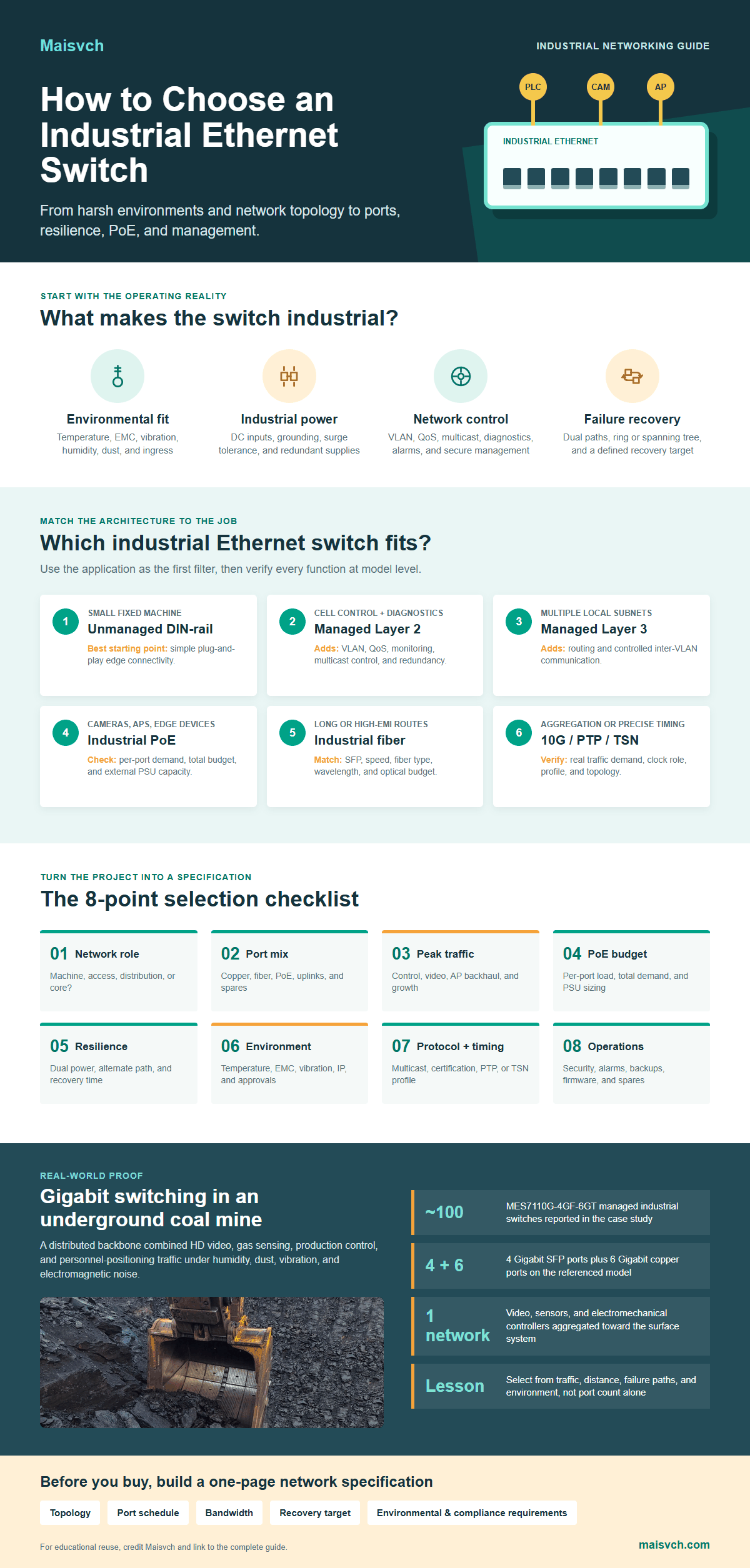
*Infographic: Maisvch Industrial Ethernet Switch Selection Framework. For media or educational reuse, please credit Maisvch and link to this guide.*
How to Choose an Industrial Ethernet Switch Step by Step
Step 1: Define the Network Role
Decide whether the switch is serving a machine, an access cabinet, a production cell, a distribution layer, or a core/aggregation layer. This determines the likely port density, management depth, uplink speed, and redundancy requirement.
Step 2: Build the Port Schedule
List every endpoint and link. Record speed, copper or fiber, PoE class and power, connector, distance, and spare-port policy. Do not combine “eight ports” into one line when four are PoE copper, two are SFP uplinks, and two are ordinary copper service ports.
Step 3: Map Traffic and Calculate Peak Demand
Identify which traffic stays local and which crosses each uplink. Include simultaneous video, AP backhaul, engineering access, backups, and future expansion. Select uplinks based on the convergence point rather than the fastest individual endpoint.
Step 4: Choose Managed or Unmanaged
Choose unmanaged only when the network can remain flat, simple, and locally maintained. Choose managed when the project needs segmentation, remote diagnostics, redundancy, multicast control, security policies, or coordinated maintenance.
Step 5: Define Availability Targets
Document what happens after a cable, power supply, or switch fails. State the maximum acceptable interruption and the topology that should survive the fault. Then select protocols and hardware that can meet that requirement as a system.
Step 6: Match the Installation Environment
Confirm input power, temperature, mounting, cabinet dimensions, grounding, EMC, vibration, ingress protection, and industry approvals. Use the exact installation location, not a generic plant-wide description.
Step 7: Validate Interoperability and Operations
Review SFP compatibility, protocol requirements, management-platform integration, configuration tools, firmware policy, and spare strategy. If the network is critical, build a representative test before deployment.
Step 8: Test the Failure Cases
Commissioning should include more than a ping test. Disconnect an uplink, remove one power source, introduce the expected multicast traffic, load the PoE ports, verify alarms, restore a saved configuration, and observe application behavior during recovery.
A Practical Selection Matrix
| Project Condition | Likely Starting Point | Verify Before Ordering |
| Small standalone machine with a fixed device list | Unmanaged DIN-rail switch | Port count, speed, power input, temperature, mounting |
| Production cell with PLCs, HMIs, drives, and diagnostics | Managed Layer 2 DIN-rail switch | VLAN, QoS, ring/RSTP, SNMP, multicast behavior |
| Multiple cells or subnets connected locally | Layer 3 managed switch | Routing scale, ACLs, redundancy, management integration |
| Cameras and wireless APs at the edge | Industrial PoE switch | PoE standard, per-port power, total budget, uplink capacity |
| Long-distance or high-EMI links | Industrial fiber switch | Fiber type, SFP, wavelength, optical budget, connector, temperature |
| Video or high-volume aggregation | Gigabit access with 10G uplinks or 10G aggregation | Peak traffic, switching capacity, buffers, fiber design |
| Railway or high-vibration equipment | M12 or industry-specific switch | Connector coding, IP rating, vibration tests, railway standards |
| Time-aware automation or power applications | PTP or TSN-capable managed switch | Required profile, clock role, accuracy, certification, topology |
Common Industrial Switch Selection Mistakes
Mistake 1. Buying by Port Count Alone
Two eight-port switches may differ in uplinks, forwarding performance, power design, management, environmental limits, and approvals. Port count is only the first filter.
Mistake 2. Treating All “Gigabit” Designs as Equal
Check which ports are Gigabit, whether uplinks are shared or independent, and whether aggregate capacity fits the traffic pattern. A Gigabit label does not answer the entire performance question.
Mistake 3. Forgetting the PoE Power Budget
Eight PoE ports do not guarantee that eight high-power devices can run simultaneously. Confirm per-port output, total budget, power-supply capacity, and startup conditions.
Mistake 4. Creating Redundant Cables Without a Redundancy Protocol
Adding a second Layer 2 path can create a loop. The physical topology and the loop-prevention or ring mechanism must be designed together.
Mistake 5. Mixing SFPs Without Link Engineering
Speed, wavelength, fiber type, connector, distance, and temperature must match on both ends. “SFP” describes a form factor, not a complete link specification.
Mistake 6. Using the Maximum Temperature as the Only Environmental Check
Temperature is one variable. EMC, vibration, humidity, condensation, ingress, corrosion, altitude, and power quality can be equally decisive.
Mistake 7. Leaving Management Until Commissioning
IP addressing, VLANs, credentials, naming, time synchronization, alarms, backups, and firmware baselines should be planned before the switches are installed across a large site.
Real-World Example: Gigabit Switching in an Underground Coal Mine
The difference between a product specification and a network solution becomes clear in a harsh, distributed application.
In a Maisvch smart underground coal mining case study, the customer needed to combine production control, personnel positioning, environmental monitoring, and high-definition video across underground substations. The site also presented humidity, coal dust, vibration, and electromagnetic noise from heavy machinery.
According to the case, approximately 100 MES7110G-4GF-6GT managed industrial Ethernet switches were deployed. Each referenced model provided four Gigabit SFP ports and six Gigabit copper ports. The switches aggregated cameras, gas sensors, and electromechanical controllers and connected those access-layer data streams toward the surface control system.
The useful lesson is not that every mining project needs the same model. It is that switch selection followed the traffic and environment: Gigabit access for converged video and telemetry, fiber uplinks for the distributed backbone, managed operation, and industrial hardware for underground conditions. A factory, railway, wind farm, or smart-city project should repeat that reasoning with its own endpoints, distances, failure targets, and compliance requirements.
Where Maisvch Industrial Ethernet Switches Fit
Maisvch’s industrial Ethernet switch portfolio covers managed and unmanaged switches, Layer 2 and Layer 3 options, PoE, fiber, DIN-rail, 10G, compact, embedded, M12, PTP, and TSN product categories. The range is intended for applications including industrial automation, transportation, smart cities, power and energy, mining, and wireless network backhaul.
That breadth makes the category page a useful starting point, but the final choice must still be made at model level. Port combinations, management functions, power input, operating temperature, certifications, protocol support, and redundancy performance differ across series and models.
When sending a project requirement to Maisvch, include the topology, endpoint list, copper and fiber distances, required uplink speed, PoE loads, environmental conditions, redundancy target, protocols, certifications, and planned quantity. A precise requirement produces a more reliable selection than a request for “an industrial switch with enough ports.”
Industrial Ethernet Switch Selection Checklist
Before approving a model, confirm:
- Network role: machine, access, distribution, or core
- Managed or unmanaged operation
- Layer 2 or Layer 3 functions
- Copper, fiber, and PoE port quantities
- Port speeds and uplink capacity
- Switching capacity and forwarding performance
- SFP/SFP+ type, fiber mode, wavelength, connector, and optical budget
- VLAN, QoS, multicast, redundancy, and diagnostic features
- Industrial protocol and timing requirements
- Input voltage, redundant power, grounding, and power consumption
- PoE standard, per-port demand, total budget, and external PSU sizing
- Operating and storage temperature
- EMC, vibration, shock, humidity, ingress, and corrosion requirements
- Mounting method and available cabinet space
- Required industry certifications and test reports
- Secure management protocols and account controls
- Firmware, vulnerability, support, warranty, and spare-unit policy
- Interoperability and failure-recovery test plan
FAQ
What does an industrial Ethernet switch do?
It connects Ethernet devices and forwards data between ports, while providing hardware, power, mounting, environmental, and management characteristics suited to industrial applications. Exact capabilities depend on the model.
What is the difference between an industrial Ethernet switch and a normal switch?
Industrial switches are designed for field conditions such as wider temperatures, vibration, electrical disturbance, industrial DC power, and cabinet mounting. They may also provide redundant power, fiber interfaces, industrial ring protocols, alarm outputs, or application-specific certifications that are uncommon in ordinary office switches.
Should I choose a managed or unmanaged industrial switch?
Choose unmanaged for a small, fixed network that only needs basic connectivity. Choose managed when you need VLANs, redundancy, QoS, multicast control, remote diagnostics, security features, or configuration management.
What is the difference between a Layer 2 and Layer 3 industrial switch?
A Layer 2 switch forwards traffic within VLANs using MAC addresses. A Layer 3 switch can also route IP traffic between subnets or VLANs. Layer 3 is useful at network boundaries and aggregation points, but it is not necessary for every edge cabinet.
When should an industrial network use fiber?
Fiber is commonly considered for long links, high-EMI routes, inter-building connections, electrical isolation between locations, and high-capacity backbones. The complete optical link must be engineered, including transceivers, fiber type, wavelength, connectors, distance, and loss.
Do I need an industrial PoE switch?
Use PoE when compatible cameras, access points, intercoms, sensors, or edge devices should receive power and data over the same cable. Confirm the required PoE standard, per-port power, total power budget, and external supply capacity.
What is ring redundancy in an industrial Ethernet network?
A ring gives traffic an alternate physical path if a link fails. A redundancy protocol prevents the ring from forming a harmful Layer 2 loop during normal operation and reconverges traffic after a fault. Recovery performance depends on the protocol, topology, node count, configuration, and equipment.
Is Gigabit Ethernet enough for an industrial network?
Often, yes. Many control and monitoring applications fit comfortably within Gigabit Ethernet. Higher-speed uplinks may be needed where many access switches, cameras, APs, machine-vision systems, or data-acquisition streams converge. Calculate the traffic at each bottleneck rather than choosing by label.
Can one switch carry PLC, camera, and wireless AP traffic?
It can, provided the switch and uplinks have enough capacity and the network is segmented and prioritized appropriately. Managed VLAN, QoS, and multicast features may be important. The design should also consider whether combining services creates an unacceptable common point of failure.
Which certifications should an industrial Ethernet switch have?
There is no single certification for every industrial application. Requirements depend on the country, installation, and sector. Rail, power, marine, mining, hazardous-area, traffic, and general industrial projects can require different safety, EMC, environmental, or protocol evidence. Verify the exact model’s certificates and reports against the project specification.
Build the Specification Before Choosing the Model
The strongest industrial Ethernet switch selection begins with a network drawing and an endpoint schedule, not a product filter. Once the traffic, topology, environment, power, recovery, and compliance requirements are visible, the switch category usually becomes much clearer.
For a simple machine, the answer may be a compact unmanaged DIN-rail switch. A production cell may need a managed Layer 2 switch with VLANs and ring redundancy. A camera or wireless edge network may need PoE and fiber uplinks. A multi-area plant may justify Layer 3 routing and 10G aggregation.
Maisvch has 25 years of experience in industrial communication and provides industrial switching options across these roles. To review suitable models, explore the Maisvch industrial Ethernet switch range or send your topology and project requirements to [email protected].